TL;DR
First-generation product analytics tools capture events into their own storage through their SDKs. Warehouse-native tools run funnels, retention and journeys on the event tables already in your data warehouse. Mixpanel, Amplitude and Heap now ship analytics agents, but an agent can only analyze what it can reach: in a vendor silo, that is the ingested events, not billing, CRM or support data. Warehouse-native analytics keeps one source of truth, avoids per-event pricing and lets an agent join behavior to revenue and CRM data. The qualifier is a cloud warehouse with event data already in it.
Warehouse-native product analytics runs funnels, retention, journeys and segmentation as queries on the event tables already in your cloud data warehouse. First-generation product analytics tools, such as Amplitude, Mixpanel and Heap, capture events through their own SDKs into their own storage and analyze them there. The choice used to be about cost and data control. Now that every tool ships an AI agent, it also decides what that agent can see.
We compare the two on criteria as of 2026: data architecture (warehouse-native versus copied event stores), governance, product analytics depth (funnels, retention, journeys), what an AI agent can reach, and self-service for non-technical teams. For neutral context, see Google Cloud's data warehouse overview and Snowflake's platform guides.
The shift to warehouse-native product analytics
Product analytics is shifting as companies look for tools that fit the data stack they already run. First-generation platforms like Amplitude and Mixpanel have long provided useful insight into user behavior, but their reliance on their own infrastructure brings data silos, reverse ETL jobs to get business data in, and pricing that grows with event volume. That is prompting teams to look at warehouse-native product analytics.
Warehouse-native tools are gaining ground among companies with an established data warehouse. They query the warehouse in place, which gives the data team more control, more flexibility and a clearer cost model. They are not replacing first-generation platforms everywhere. Some companies run both for a while, using each where it fits.
The choice depends on data maturity and goals. Companies with a warehouse, a data team and business data worth joining to behavior tend to favor warehouse-native tools. Small teams with no warehouse often get more from the quick SDK setup of a first-generation tool.
Why companies are moving to warehouse-native analytics?
- Unified data:
Companies want all their data in one place for a complete picture. Warehouse-native analytics works directly on the central warehouse, so product events sit next to revenue, CRM and support data instead of in a separate silo.
- Cost:
Warehouse-native tools use the warehouse you already pay for. There is no second copy of the data to store, no ingestion pipeline into a vendor, and no bill that grows with every tracked event.
- Flexibility:
Because analysis runs on your own tables, teams can analyze any modeled table or dbt model, not just the events that were sent to a vendor, and adapt as business questions change.
- Security and compliance:
Keeping data in your own warehouse keeps it under your access policies and your residency guarantees. This matters most in fintech, healthcare and companies with EU data residency requirements.
Key benefits of warehouse-native product analytics
Warehouse-native product analytics changes how teams analyze behavior by using the modern data warehouse as the analytics backend. It suits businesses that have outgrown the siloed model of first-generation platforms. Here is how the architecture works.
How Warehouse-Native Analytics Works: Architecture and Workflow?
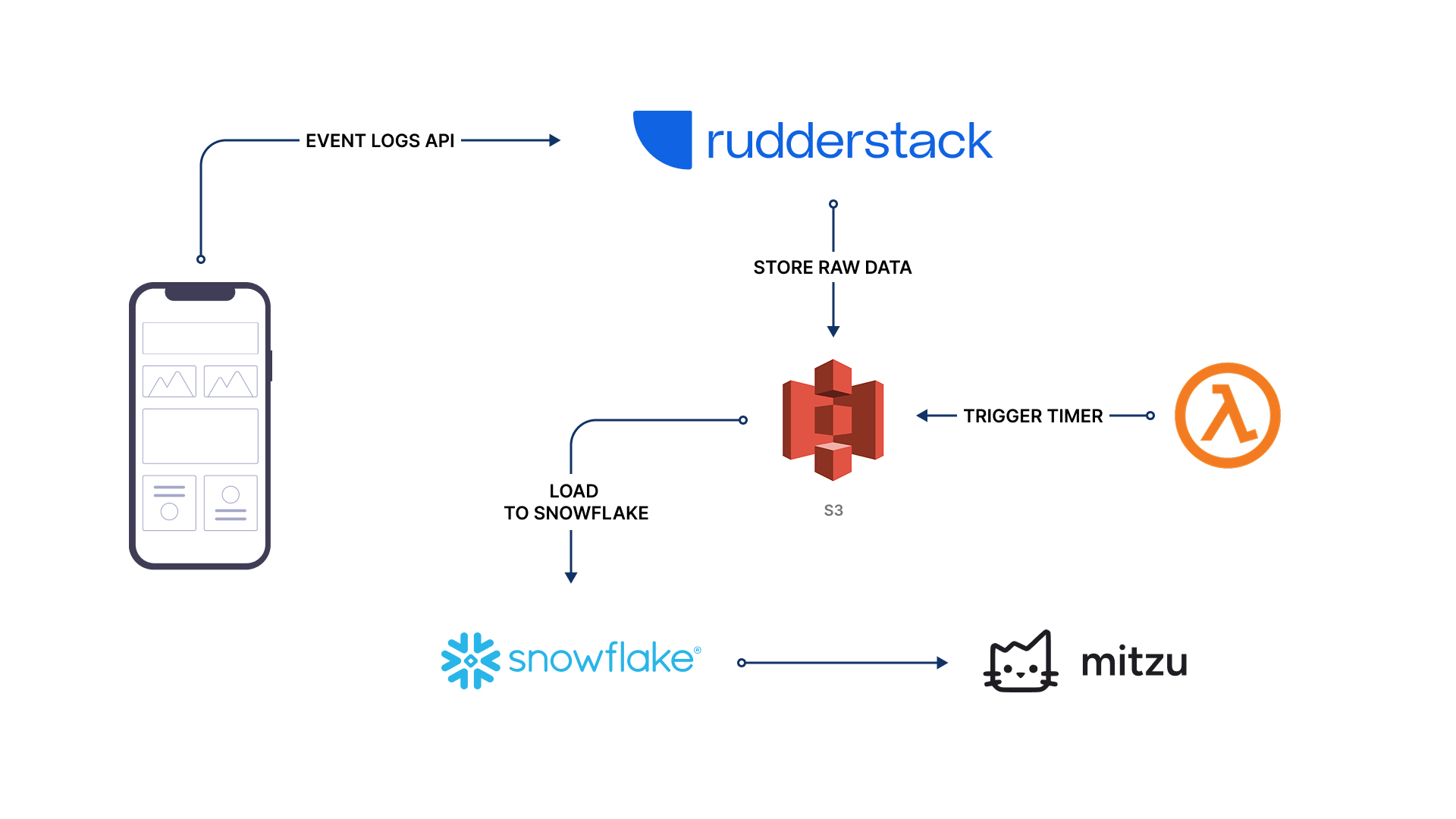
Warehouse-native platforms work directly with a company's existing data warehouse, keeping data storage and processing separate from the analytics tool:
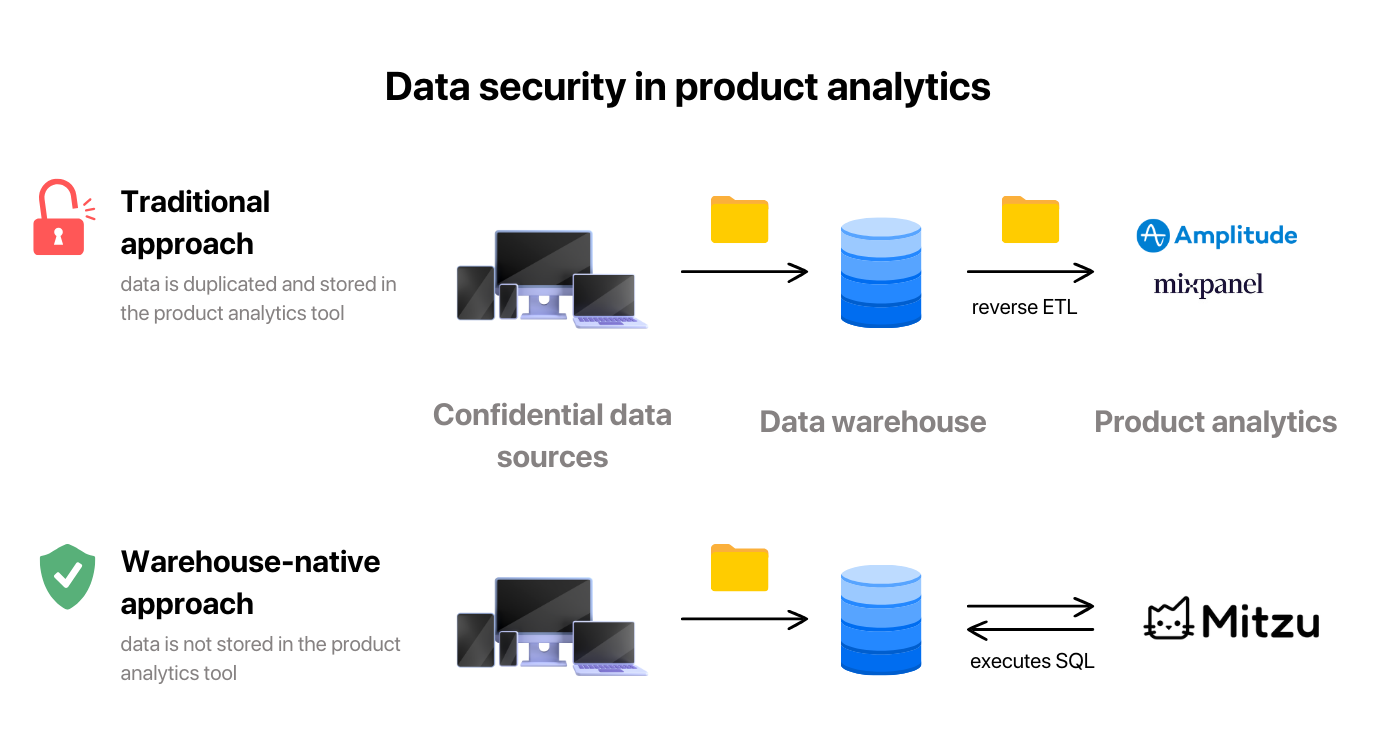
- Collecting data: events come from apps, servers and cloud services through a CDP or pipeline such as Segment, Snowplow or RudderStack. Instead of going into an analytics vendor's storage, they land in the company's data warehouse.
- Storing and managing data: in the warehouse, the data team manages the data under its own rules for security, access and compliance.
- Preparing data: the data team cleans and models the data with dbt or SQL models, alongside billing, CRM and other business tables.
- Analyzing and visualizing data: the analytics tool connects to the warehouse and generates the SQL for each analysis, so non-technical people can build reports, dashboards and funnels without copying or moving data.
Core technologies behind warehouse-native analytics
Data Warehouses:
Modern data warehouses like Google BigQuery, Amazon Redshift, Snowflake, Databricks and ClickHouse are built for analytics on large data volumes. They are the scalable backbone of warehouse-native analytics.
ELT Processes:
Extract, Load, Transform (ELT) is favored over traditional ETL because it uses the warehouse to transform data after it is loaded, which is more efficient and flexible.
Query Engines and Analytical Tools:
Warehouse-native platforms generate SQL and run it directly against the warehouse, so there is no extra data movement or transformation outside it.
User Interfaces:
These platforms give people with different levels of technical skill a way to work with data without writing SQL: point-and-click analysis, dashboards and, increasingly, an AI agent.
Analytics agents in the vendor silo
Mixpanel, Amplitude and Heap have all shipped analytics agents. They are competent at what they do: ask about a funnel or a retention curve inside the tool, and the agent builds it with the vendor's own analysis methodology, which these platforms have refined for a decade. But an agent can only analyze data it can reach, and these agents mostly reach one place: the vendor's own storage. Every answer is bounded by what your SDKs and pipelines ingested.
That boundary, not the quality of the agent, is the architectural question to evaluate.
- The agent's world is the ingested events. Billing history, CRM fields, support tickets, feature flags, NPS scores: anything that never went through the ingestion pipeline does not exist for the agent.
- Every question you might ask later becomes an ingestion decision now. Want the agent to segment by contract value next quarter? Someone has to pipe contract value into the vendor first, and per-event, per-property pricing makes "send everything just in case" an expensive default.
- The data is a copy. The warehouse stays the source of truth for the rest of the company, while the agent reasons over a second, partial version of reality that drifts from it.
None of this mattered much when the tool's job was rendering funnels for a product team. It matters when an agent is meant to investigate on its own, pulling in whatever data is relevant. The gap shows up on exactly the questions that make an agent worth having, the ones that join behavior to business context:
- Which onboarding behaviors predict expansion revenue? Needs billing data next to events.
- Do enterprise accounts that filed support tickets in week one retain worse? Needs the support system and the CRM.
- LTV by acquisition channel for users who completed activation. Needs revenue joined to behavior.
- Feature usage for accounts up for renewal this quarter, with NPS. Needs CRM fields and survey data.
Inside a vendor silo, each of these ends the same way: the events are there, the business data is not, and the answer is "export to a spreadsheet and reconcile by hand." In the warehouse, these are joins across tables that already sit next to each other.
| Vendor-silo agent | Warehouse-native agent | |
|---|---|---|
| Data the agent can reach | Events ingested through the vendor's SDKs and pipelines | Everything in the warehouse: events, billing, CRM, support, dbt models |
| Joins to business data | Only properties someone chose to sync into the silo | Native joins to tables already modeled in the warehouse |
| Source of truth | A copy that drifts from the warehouse | The warehouse itself: the same numbers the data team reports |
| Data egress | Behavioral data lives in vendor storage | No egress; data stays in your infrastructure |
| Pricing pressure | Scales with event volume | Independent of event volume; you control warehouse compute |
| New data available to the agent | After pipeline work to ingest it | As soon as it lands in the warehouse |
Note what this argument is not: the vendor agents are not bad agents. If your product analytics lives happily in Mixpanel or Amplitude and your questions stay inside the event data, they will serve those questions well. The limitation is structural, and it holds however good the agent on top gets.
Advantages over first-generation platforms

- No data duplication: the data stays in the warehouse, so there is no second copy to pay for, sync and reconcile.
- No sync lag: queries read the warehouse as it is, so freshness depends only on how often your own pipelines load data.
- One set of definitions: metrics are defined once on the warehouse tables and reused, instead of a second set of definitions inside the vendor.
- Scalability: as data grows, the warehouse scales with it, without re-architecting the analytics layer.
For companies that already treat the warehouse as the source of truth, warehouse-native analytics removes the last major copy of product data and puts product analytics on the same footing as the rest of the company's reporting.
Cost efficiency of warehouse-native solutions
- No duplication costs: warehouse-native tools don't store a separate copy of your data.
- No reverse ETL costs: there is no job moving data from the warehouse into the product analytics tool.
- Lower process costs: nobody has to decide what to send to the vendor, what not to send, or what to delete there.
- Compute you control: queries run on warehouse compute you already govern, and the analytics bill does not scale with event volume.
- Lower opportunity cost: analysis that joins behavior to revenue and CRM data answers the questions that move decisions, instead of stopping at the silo boundary.
Warehouse access without giving up methodology
The historical trade-off was that tools with full warehouse access were BI-shaped: they could see everything but couldn't express funnels, retention or journeys well, and their AI features write SQL freehand, with the methodology risks described in analytics agents vs text-to-SQL. The first-generation tools had the methodology; the warehouse tools had the data.
That gap can now be closed from the warehouse side. Mitzu runs on your warehouse and encodes analytics methodology in a deterministic query engine: the analytics agent assembles analysis specifications (funnel steps, conversion windows, cohort definitions) and the engine generates the SQL. Behavioral methodology and warehouse joins land in the same answer: a funnel broken down by CRM segment, retention by billing tier, activation joined to support history.
The grounding for those answers is a semantic layer drafted from the warehouse: events, entities and sampled property values discovered by scanning, plus metric definitions on fact and dimension tables, reviewed and owned by the data team. How that layer keeps the agent honest is covered in why an analytics agent needs a semantic layer.
How to evaluate the two architectures?
- List your last ten analytics questions. How many needed data beyond product events, such as revenue, CRM or support? Those are the ones a silo agent can't take.
- Check where your events already land. If they flow to a warehouse via Segment, Snowplow, RudderStack, Firebase or dbt models, a warehouse-native tool starts from data you already have.
- Price the counterfactual: what would syncing billing, CRM and support data into the vendor cost, in pipeline work and in per-event fees?
- Ask where answers need to be verified. Warehouse-native answers can be checked against the same tables your data team reports from.
Moving to Mitzu
Mitzu is an analytics platform on your data warehouse for BI, product analytics and experiment analysis, where the data team governs the metrics and everyone uses them through dashboards, an AI agent, Slack and their own AI assistants.
Mitzu's Configuration Agent scans the warehouse for event and dimension tables, identifiers and property values, and Mitzu drafts metric definitions from your tables and dbt models for the data team to review. Queries run in place on BigQuery, ClickHouse, Snowflake, Databricks, Redshift and other warehouses, with no reverse ETL. Teams track user journeys, conversion, retention and revenue on the same definitions, and read A/B test results on them too.
Mitzu's agent builds analysis specifications that a deterministic engine turns into SQL, so non-technical teams can explore data without writing SQL and the same question gets the same answer. Warehouse policies apply to Mitzu's connection, and Mitzu roles decide what each person sees in dashboards, the agent, Slack and AI assistants. Setup is fast, though not zero: the data team reviews the drafted definitions before everyone else starts asking.

It suits companies that want product analytics, KPI reporting and segmentation on one set of definitions, while keeping the data inside the warehouse. See the AI analytics agent for what the agent does with warehouse data.
FAQ
What does warehouse-native product analytics mean?
Funnels, retention, journeys and segmentation run as queries against tables in your cloud warehouse, without maintaining a duplicate event store inside a separate analytics vendor.
How is that different from first-generation product analytics?
First-generation tools optimized for fast SDK integration and a hosted event database. Warehouse-native tools prioritize fit with the modern data stack: one source of truth, metric definitions on warehouse tables, joins to business data and no data movement.
Can Amplitude or Mixpanel agents query my data warehouse?
Mostly not. These agents are built around the vendor's own data model; Amplitude has offered a warehouse-native mode on Snowflake, so check whether it is available to you and which of its AI features work there. Otherwise, warehouse data takes part only if it is synced into the vendor first, which means pipeline work per property and, with event-volume pricing, ongoing cost per event.
How do AI agents fit in?
With data in one place, AI analytics agents can answer questions that mix behavior with revenue, CRM and support data, and show the SQL behind each answer. See what agentic analytics is for the wider picture.
Is a warehouse-native tool harder to set up?
The qualifier is having a cloud warehouse with event data landing in it, which is common in teams using Segment, Snowplow, RudderStack, Firebase or dbt. From there, Mitzu's Configuration Agent scans the warehouse and Mitzu drafts the semantic layer. Setup is fast, though not zero: the data team reviews the result.
What about data residency and compliance?
With a warehouse-native tool, behavioral data is not copied into a vendor's cloud for analysis. It stays in your warehouse, under your access policies, which matters for fintech, healthcare and companies with EU data residency requirements.
When is a first-generation tool the right choice?
When your questions stay inside the event data and you have no warehouse to join against, or no reason to migrate. If your company runs a warehouse and keeps asking questions that mix behavior with revenue or CRM data, the silo boundary will show up in every investigation.