
TL;DR
Learn how to perform ID stitching in Databricks to unify fragmented user data, including Databricks account ID, and create a cohesive view of customer behavior. Use this comparison to evaluate tools through an agentic analytics lens: which platform enables an AI data analyst workflow with trusted SQL and a trusted semantic layer, not just faster dashboarding.
Use this comparison to evaluate tools through an agentic analytics lens: which platform enables an AI data analyst workflow with trusted SQL and a trusted semantic layer, not just faster dashboarding.
We document evaluation criteria as of 2026: data architecture (warehouse-native versus copied event stores), governance, product analytics depth (funnels, retention, journeys), and self-serve access for non-technical teams. See Databricks lakehouse guidance and Apache Iceberg documentation where table formats matter.
The Challenge of User Identification in B2C Data Warehouses
User identification in data is a recurring problem for warehouse-first B2C companies. A single user can be identified with multiple aliases in the datasets:
✅ user_id - ID after sign-in✅ device_id - Mobile or desktop device's ID✅ anonymous_id - Tracking cookie✅ customer_id - Stripe✅ contact_id - Hubspot✅ email - Used for sign-in... and many more.
Picking a single identifier for user identification is risky. You may end up:❌ not being able to use that identifier for all your users❌ multiple identifiers for the same user
Creating a Unified User Identity: The ID Stitching Solution
ℹ️ The correct solution is to merge all these IDs into a single merged ID and create a user alias table where all aliases are associated with their merged IDs.
This approach is called retroactive user recognition or ID Stitching and it simplifies data modelling significantly. You won't have to think about which ID to use in joins. You can safely use the merged ID once they are backfilled to the all tables.
Implementing ID Stitching in Databricks: A Practical Example
It is the simplest to explain this challenge with an example. Imagine you have a dataset that contains app events of users.
It has four columns:
- event_time
- device_id
- user_id
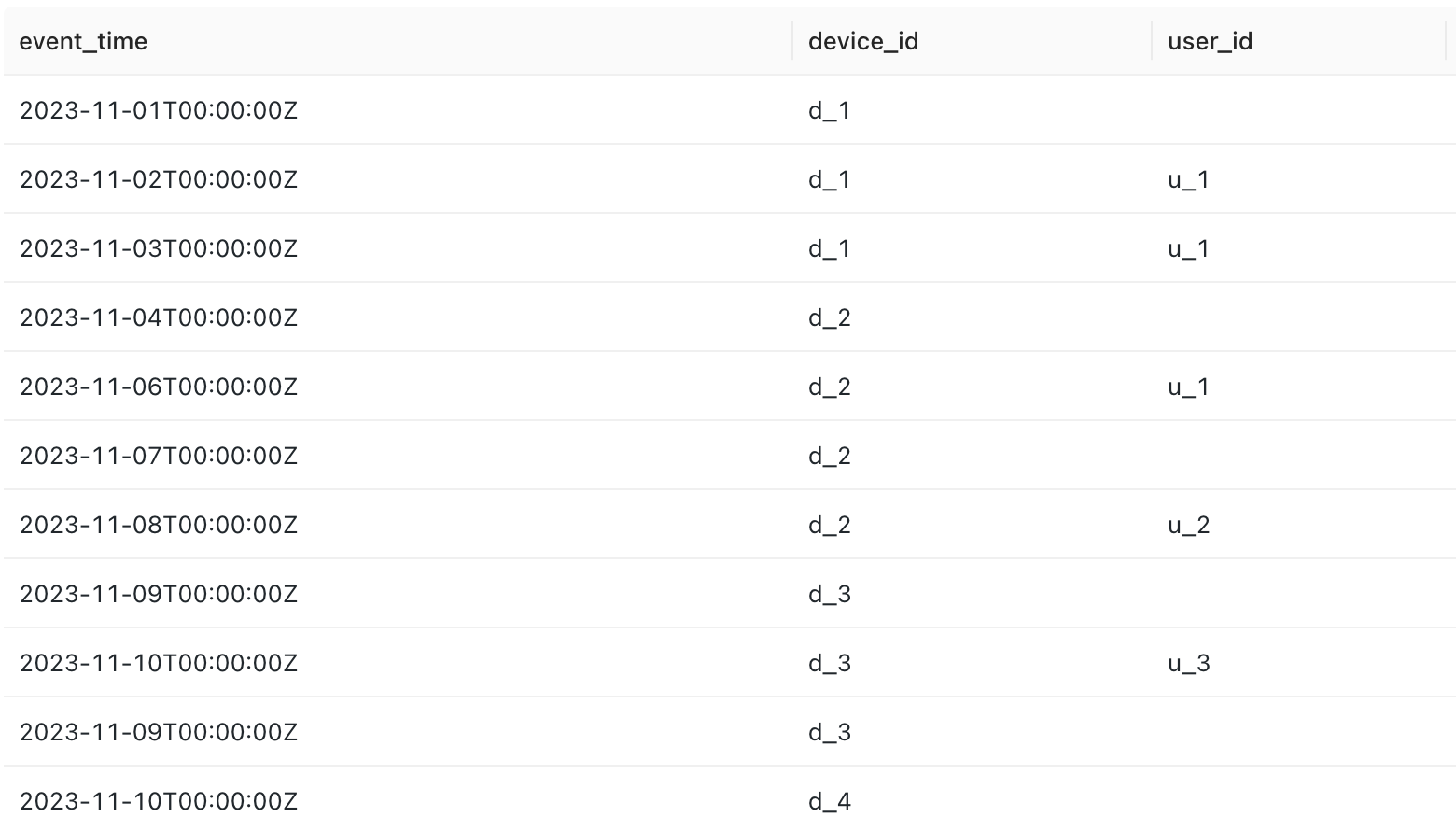
The device_id is always filled from the device's internal memory. However, in the data warehouse, it may change as the user switches to another device.
The goal is to find the first device_id of the user.
Setting Up Graphframes for User Identification
The user_ids and device_ids are in pairs sometimes, as we can see. You can consider these pairs as edges of graphs.
If we would have to visualize it, it would look like the following:
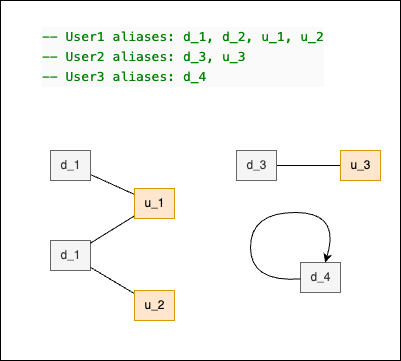
The subgraphs in this case are called components.Each component represents a single user of the example app. To find the first device_id, we need to see all the user graph components.
Finding the graph components requires very complex SQL queries with recursive CTEs. SparkSQL does not yet support this at the moment. However, a handy library called Graphframes for Databricks (available in PySpark) is capable of finding the graph components with just a few lines of Python code in virtually any dataset.
Executing the Connected Components Algorithm
First, we must install the Graphframes library on a Python-enabled Databricks cluster.
Find the Maven library graphframes:graphframes:0.8.3-spark3.5-s_2.12. There are multiple versions of this library. The only things that matter are the Scala and Spark version numbers. For the above Graphframe's version is working only withDBR 14.2 (includes Apache Spark 3.5.0, Scala 2.12)
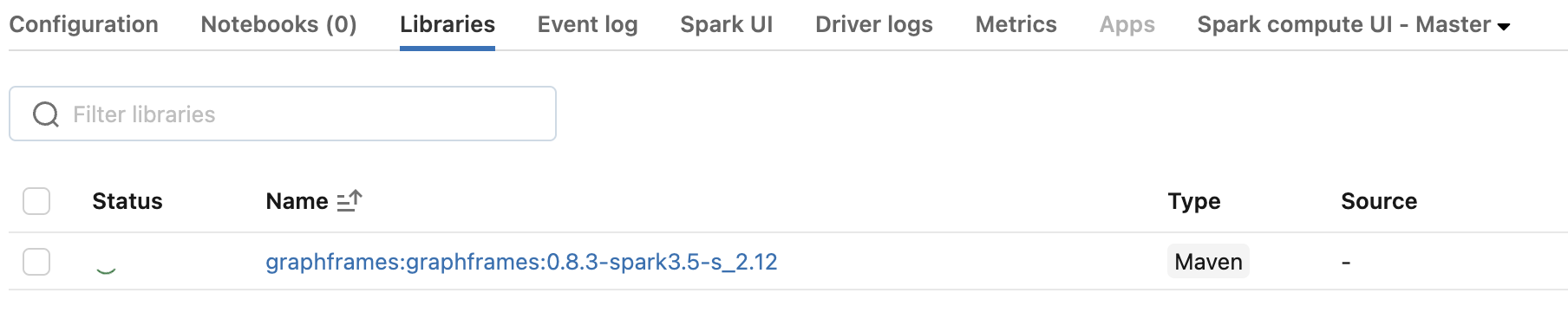
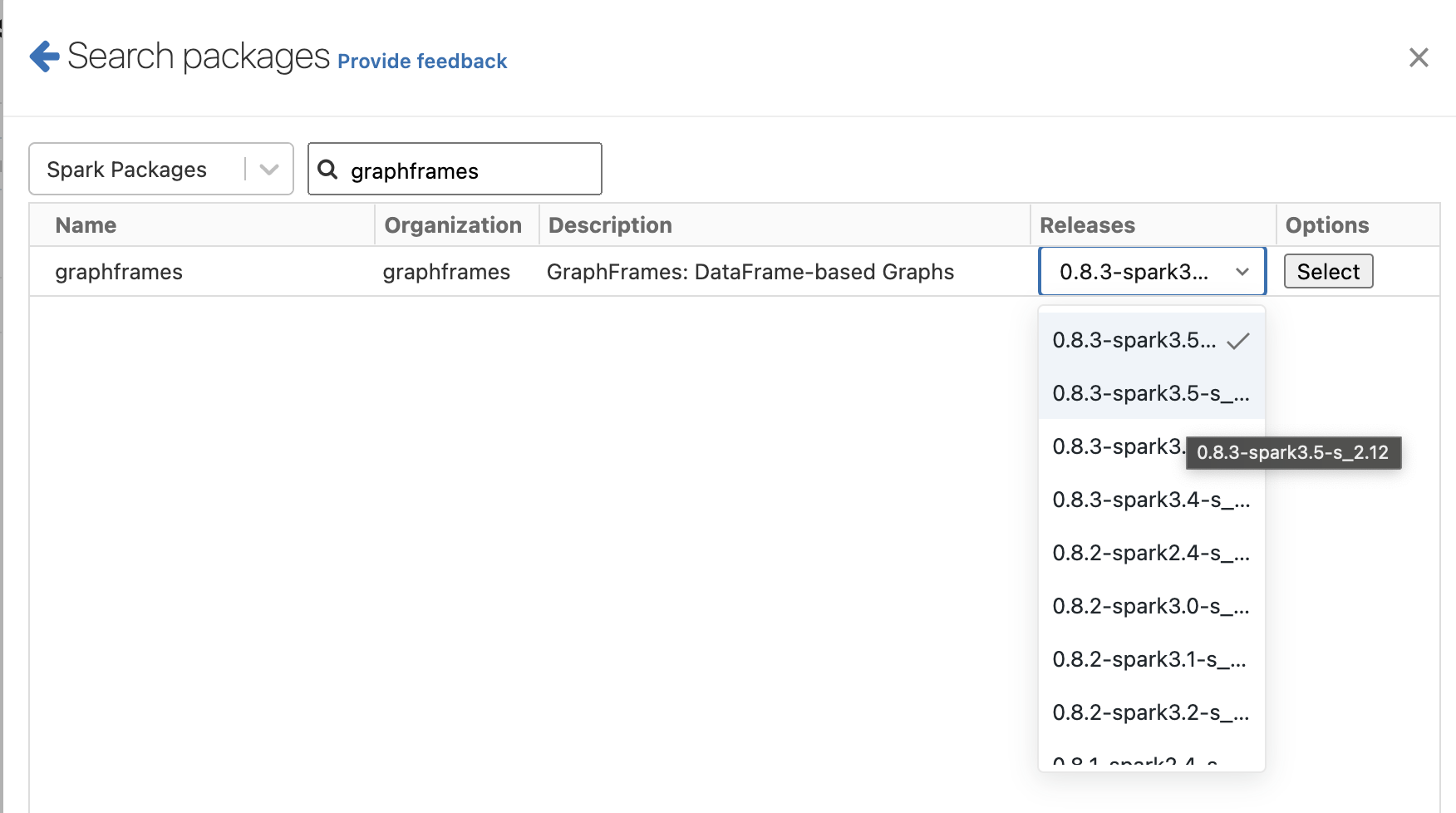
To test if your configuration works, you must execute the following code snippet without problem.
Note, that Graphframes library require cluster checkpoints.
from pyspark.sql import SparkSession
from graphframes import *

spark = SparkSession.builder.getOrCreate()
spark.sparkContext.setCheckpointDir('s3://my_bucket/checkpoints/')
from pyspark.sql import SparkSession
from graphframes import *
spark = SparkSession.builder.getOrCreate()
spark.sparkContext.setCheckpointDir('s3://my_bucket/checkpoints/')DROP TABLE test_events;
CREATE TABLE test_events (
event_time TIMESTAMP,
device_id STRING,
user_id STRING,
merged_id STRING
)USING DELTA
LOCATION 's3://my_bucket/test/default/test_events/';
-- User1 aliases: d_1, d_2, u_1, u_2
-- User2 aliases: d_3, u_3
-- User3 aliases: d_4
INSERT INTO test_events (event_time, device_id, user_id) VALUES
('2023-11-01', 'd_1', null),
('2023-11-02', 'd_1', 'u_1'),
('2023-11-03', 'd_1', 'u_1'),
('2023-11-04', 'd_2', null),
('2023-11-06', 'd_2', 'u_1'),
('2023-11-07', 'd_2', null),
('2023-11-08', 'd_2', 'u_2'),
('2023-11-09', 'd_3', null),
('2023-11-10', 'd_3', 'u_3'),
('2023-11-09', 'd_3', null),
('2023-11-10', 'd_4', null);
select * from test_events;from pyspark.sql import SparkSession
from graphframes import *
spark = SparkSession.builder.getOrCreate()
spark.sparkContext.setCheckpointDir('s3://my_bucket/checkpoints/')
# Finding the vertices with their first occurence
vertices = spark.sql(
"""
select
device_id as id,
min(event_time) as first_event_time -- selecting first event time for the device_id
from test_events
where device_id is not null
group by 1
union all
select
user_id as id,
min(event_time) as first_event_time -- selecting first event time for the user_id
from test_events
where user is not null
group by 1
"""
)
vertices.write.option("path", "s3://my_bucket/test/default/vertices/").saveAsTable("vertices", mode="overwrite")
# Finding the edges of the graph
edges = spark.sql(
"""
with directed as (
select
distinct
device_id as src, -- device_id is always present
coalesce(user_id, device_id) as dst -- if edge pointing then pointing itself
from test_events
)
select src, dst from directed
union
select dst, src from directed
"""
)
g = GraphFrame(e=edges, v=vertices)
res = g.connectedComponents()
res.write.option("path", "s3://my_bucket/test/default/user_aliases/").saveAsTable("user_aliases", mode="overwrite")select
id as alias,
component,
first(id) over (partition by component order by first_event_time) as merged_id
from user_aliasesMERGE INTO test_events te
USING user_aliases ua
ON (
ua.alias = te.device_id
AND (
te.merged_id IS NULL
OR te.merged_id != ua.merged_id
)
)
WHEN MATCHED THEN UPDATE
SET te.merged_id = ua.merged_id;Materialising the Stitched Identity Table
Once alias relationships are available, the next step is persisting a reusable identity table for downstream analytics. In Databricks, teams often create a resolved_users Delta table that maps every event-side anonymous_id to a stable resolved_user_id. This table becomes the backbone for consistent user-level metrics.
CREATE OR REPLACE TABLE analytics.resolved_users
USING DELTA AS
SELECT
  e.anonymous_id,
  COALESCE(e.user_id, a.user_id) AS resolved_user_id,
  MIN(e.event_time) AS first_seen_at
FROM analytics.events e
LEFT JOIN analytics.identity_aliases a
  ON e.anonymous_id = a.anonymous_id
GROUP BY 1, 2
Incremental Stitching with Delta Lake
For large datasets, recomputing full identity every day is expensive and unnecessary. A better pattern is processing only new alias records since the last successful run, then merging updates into the resolved identity table. Delta Lake MERGE makes this pattern reliable and auditable.
MERGE INTO analytics.resolved_users t
USING (
  SELECT anonymous_id, user_id, alias_created_at
  FROM analytics.identity_aliases
  WHERE alias_created_at > '{{ last_watermark_ts }}'
) s
ON t.anonymous_id = s.anonymous_id
WHEN MATCHED THEN UPDATE SET
  t.resolved_user_id = s.user_id
WHEN NOT MATCHED THEN INSERT (anonymous_id, resolved_user_id, first_seen_at)
VALUES (s.anonymous_id, s.user_id, s.alias_created_at)
Using the Stitched Table in Mitzu
After resolved identity is materialized, configure Mitzu's event model to join events against this table for user resolution. Teams typically expose this as an identity stitching table in the model so every funnel, cohort, and segmentation query uses resolved IDs by default. This removes repetitive per-analysis joins and keeps behavior consistent across the organization.
Common Pitfalls
- Circular aliases (A -> B -> C) can create unstable mappings. Use canonicalization rules and deterministic tie-breakers.
- Late-arriving alias events can miss historical backfill if your incremental window is too narrow. Schedule periodic backfill sweeps.
- Bot traffic can flood anonymous IDs and bloat identity tables. Filter bots before identity stitching and set retention rules.
Conclusion
Warehouse-native stitching in Databricks gives teams full control over identity rules and complete auditability over every update. Instead of relying on opaque CDP behavior, you can inspect SQL, monitor quality, and adapt logic as product behavior changes. Mitzu then consumes that stitched identity directly so product analytics stays accurate without duplicating data into separate tools.
FAQ
How often should I refresh identity stitching in Databricks?
Most teams run incremental stitching hourly or nightly, depending on product reporting latency requirements. If onboarding and activation reporting are near real-time, shorter intervals are better. A weekly full reconciliation job is still useful to catch missed late-arriving aliases.
Can Databricks AutoLoader process alias events in near real-time?
Yes. AutoLoader is commonly used to ingest alias streams into Delta tables with low operational overhead. From there, you can trigger incremental MERGE jobs that update resolved identities quickly. This pattern is practical when user stitching freshness directly impacts growth experiments.
What happens to historical data when a user stitches a new device?
Historical anonymous events can be reassigned to the resolved identity once a new alias link is recorded. That is why backfill strategy matters: without retroactive stitching, historical funnels and retention remain fragmented. A robust stitching job updates both new and relevant historical rows.
Should I stitch in SQL only, or also in Python graph workflows?
Simple mappings often work with SQL-only approaches, especially alias-table joins. Complex multi-hop identity graphs may need graph processing in PySpark before writing canonical mappings to Delta. Many teams combine both: graph resolution logic in batch, SQL joins for production analytics.