TL;DR
Leverage GA4 and BigQuery with Mitzu.io to gain deeper insights into user behavior and revenue impact with a streamlined, semantic-layer grounded solution. Use this comparison to evaluate tools through an agentic analytics lens: which platform enables an AI data analyst workflow with trusted SQL and a trusted semantic layer, not just faster dashboarding.
Use this comparison to evaluate tools through an agentic analytics lens: which platform enables an AI data analyst workflow with trusted SQL and a trusted semantic layer, not just faster dashboarding.
Using GA4 with BigQuery for Product Analytics
Google Analytics 4 (GA4), introduced in October 2020, is positioned as a successor to Universal Analytics(UA). GA4 aimed to enhance privacy standards in data collection and incorporated more AI and machine learning than UA, offering potential benefits for marketers.
The Challenges of Transitioning to GA4
In a nutshell, people at Google wanted GA4 to become the next marketing and product analytics solution for any business.Google announced that GA4 would replace Universal Analytics in July 2023, and historical data would not transfer from UA to GA4. Two years later, it is painfully clear the transition was neither smooth nor well-received.
Why GA4 Is Difficult to Use for Marketers?
- GA4 is Difficult to Use: The GA4 charts, reports, and dashboards are complicated to navigate, and most marketers easily get lost.
- Bad User-Interface: The primary concern raised by marketers regarding GA4 was its user interface. Filtering, user segmentation, or just finding features is complex at best. Users of GA4 easily get lost in endless menus and modals.
- Data Lag: In the free tier, GA4 offers one or more days lag for data, which is often insufficient for marketers.
- Data Discrepancies: Data quality is often mentioned as the primary problem with GA4. Insights in GA4 can diverge or contradict insights from other tools, usually leading to confusion.
- Insufficient for Complex Analytics: While simple insights can be a good enough solution If someone wants to dig deeper into the data, it often hits a block.
BigQuery as the Solution for Advanced GA4 Analytics
While the GA4 user interface may be sufficient for basic requirements, answering more complex questions can be impossible. Luckily, you can export all your GA4 data to BigQuery for free (up until a limit). Here is a great description and video from Google on how to do it:
https://support.google.com/analytics/answer/9358801?hl=en
Exporting GA4 Data to BigQuery: Batch vs. Streaming Options
You can set up daily batch exports or use the streaming approach to BigQuery. While the streaming approach requires you to share your credit card details, it solves the issue of data lag. You will see almost immediately all your GA4 tracked events in BigQuery.
If data lag is not something you are concerned about, stick to daily batch exports. It is free.
Navigating the GA4 Data Model in BigQuery
Having your GA4 data in BigQuery comes with a lot of benefits. The obvious one is that you can connect Looker Studio or similar data tools to it. However, there is a caveat. GA4 data model is very complex. You must be an "expert" in SQL to answer any questions from your raw BigQuery data.The main issue with the BigQuery GA4 data is the REPEATED type for the Event Param column.
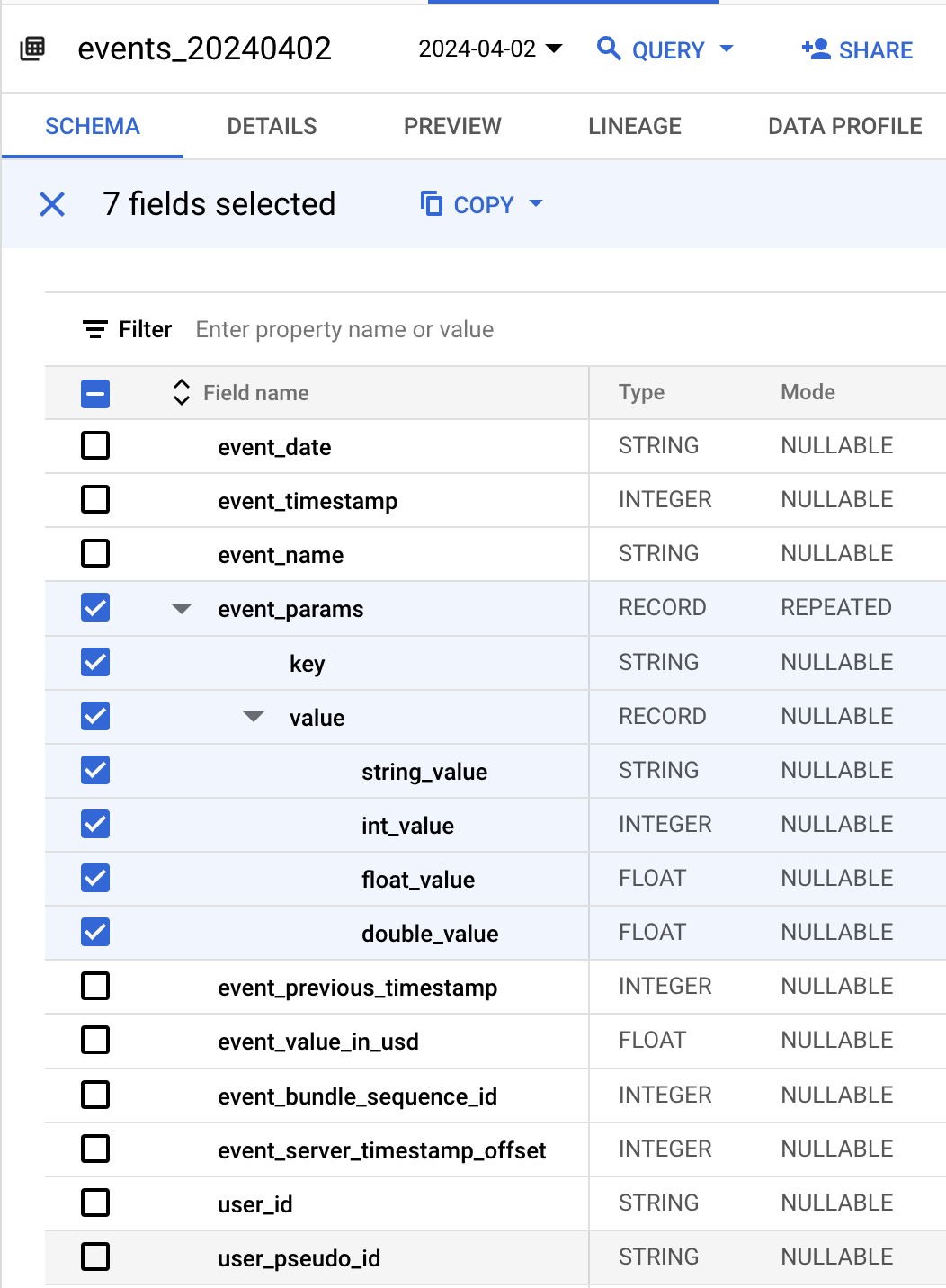
The Problem with REPEATED Types in GA4 Data
Repeated types are the arrays in BigQuery. The main issue with arrays in SQL is that you need to know which element to access by its index.
SELECT
  event_name,
  user_pseudo_id,
  event_timestamp,
  params.key,
  params.value
FROM `.events_YYYYMMDD`,
UNNEST(event_params) AS params
WHERE
  event_name = 'page_view'
SELECT
event_name,
user_pseudo_id,
event_timestamp,
params.key,
params.value
FROM `<project>.events_YYYYMMDD`,
UNNEST(event_params) AS params
WHERE
event_name = 'page_view'CREATE OR REPLACE TABLE `<project>.<dataset>.ga4_events` AS (
WITH
event_properties AS (
SELECT
event_timestamp,
user_id,
user_pseudo_id,
event_name,
JSON_OBJECT(ARRAY_AGG(p.key), ARRAY_AGG(COALESCE(COALESCE(COALESCE(p.value.string_value, CAST(p.value.int_value AS string)), CAST(p.value.float_value AS string)), CAST(p.value.double_value AS string)))) event_params
FROM
`<project>.<dataset>.events_*`,
UNNEST(event_params) AS p
GROUP BY
1,
2,
3,
4 ),
user_properties AS (
SELECT
event_timestamp,
user_id,
user_pseudo_id,
event_name,
JSON_OBJECT(ARRAY_AGG(p.key), ARRAY_AGG(COALESCE(COALESCE(COALESCE(p.value.string_value, CAST(p.value.int_value AS string)), CAST(p.value.float_value AS string)), CAST(p.value.double_value AS string)))) user_properties
FROM
`<project>.<dataset>.events_*`,
UNNEST(user_properties) AS p
GROUP BY
1,
2,
3,
4 )
SELECT
TIMESTAMP_MICROS(evt.event_timestamp) AS event_time,
ep.event_params,
up.user_properties,
evt.* EXCEPT (event_timestamp,
event_params,
user_properties,
items)
FROM
`<project>.<dataset>.events_*` AS evt
LEFT JOIN
event_properties ep
ON
evt.event_timestamp = ep.event_timestamp
AND COALESCE(evt.user_id,'')=COALESCE(ep.user_id,'')
AND evt.user_pseudo_id =ep.user_pseudo_id
AND evt.event_name = ep.event_name
LEFT JOIN
user_properties up
ON
evt.event_timestamp = up.event_timestamp
AND COALESCE(evt.user_id,'')=COALESCE(up.user_id,'')
AND evt.user_pseudo_id =up.user_pseudo_id
AND evt.event_name = up.event_name)SELECT
event_name,
user_pseudo_id,
event_time
FROM `<schema>.ga4_events`
WHERE json_value(event_params['page_title']) = 'Mitzu - Simple Warehouse Native Product Analytics'
AND event_name='page_view'Querying GA4 Data in BigQuery with Mitzu
Mitzu can connect directly to GA4 export tables in BigQuery, usually in the analytics_XXXXXXXXX.events_* format. During setup, you map event_name, user identifiers, and event timestamp, then define how nested event_params fields should be exposed as queryable properties. This removes repetitive manual UNNEST logic for every analysis.
For teams tracking conversion journeys, surfacing parameters like page_location, session_id, or campaign values as first-class properties is critical. Once modeled, these become filterable dimensions in Mitzu's visual analysis builder, while still executing as native BigQuery SQL.
Building Funnels and Retention on GA4 BigQuery Data
A practical funnel is page_view on the pricing page -> sign_up -> first_dashboard_viewed. In raw SQL, this requires staged CTEs, timestamp ordering, and repeated event_params extraction. Mitzu uses the same source tables but lets product teams build this funnel visually and inspect generated SQL when needed.
SELECT
  user_pseudo_id,
  MIN(CASE WHEN event_name = 'page_view'
    AND JSON_VALUE(event_params['page_location']) LIKE '%/pricing%' THEN event_time END) AS pricing_view_at,
  MIN(CASE WHEN event_name = 'sign_up' THEN event_time END) AS signup_at,
  MIN(CASE WHEN event_name = 'first_dashboard_viewed' THEN event_time END) AS first_value_at
FROM `<project>.<dataset>.ga4_events`
GROUP BY 1
Limitations of GA4 for Product Analytics (and how BigQuery helps)
GA4's built-in interface is useful for marketing teams but has practical limits for product analytics at scale. Explorations have dimension/metric constraints, historical windows are limited, and joining with non-GA4 business systems is not native. BigQuery removes these constraints by giving direct SQL access to full event history and any other warehouse table.
With Mitzu on BigQuery, teams can combine GA4 behavior with CRM lifecycle stages, subscription status, revenue cohorts, and support context in one analysis path. That changes analytics from isolated event reporting to business-aware product decision making.
Agentic Analytics on GA4 + BigQuery
Instead of pre-building every dashboard, a product manager can ask Mitzu's AI agent: "Which landing pages have the highest activation funnel conversion this quarter?" The agent translates the question into SQL across GA4 event tables and related business dimensions, runs it in BigQuery, and returns a chart plus transparent query output.
This is powerful because the query context is not limited to GA4's event schema. The same analysis can include paid channel attribution, account segment, or plan data from other warehouse tables without switching tools.
FAQ
Does Mitzu handle GA4's nested event_params structure automatically?
Mitzu can model GA4's nested parameters as queryable properties so teams are not writing UNNEST logic for every chart. You still keep SQL transparency, but setup centralizes parameter mapping once. This makes recurring product analyses much faster and less error-prone.
Can I join GA4 BigQuery data with CRM data in Mitzu?
Yes. That is one of the main benefits of warehouse-native analytics. As long as CRM or revenue tables are available in BigQuery and included in your model, Mitzu can generate joins for cross-domain analysis.
How is Mitzu on GA4 BigQuery different from using Looker Studio only?
Looker Studio is a flexible BI layer, but product analytics workflows like ordered funnels, retention cohorts, and journey analysis often need custom modeling and repetitive SQL. Mitzu provides product-specific analytical primitives on top of the same BigQuery data. Teams get self-serve product workflows without sacrificing warehouse control.
Does GA4 BigQuery export include enhanced measurement event types?
In most setups, yes, GA4 export includes the enhanced measurement events that GA4 collects for the property. The exact coverage depends on your GA4 configuration and property settings. Always validate key event completeness before using the data for funnel or retention baselines.