TL;DR
Mitzu vs Google Analytics 4 (GA4) compared by data model, attribution depth, pricing, and product analytics capabilities. Mitzu Vs Google Analytics 4 Ga4 is a high-intent search topic for analytics teams evaluating tools this year.
The difference between Mitzu & Google Analytics 4 (GA4)
1. Introduction
Mitzu Vs Google Analytics 4 Ga4 is a high-intent search topic for analytics teams evaluating tools this year. Choosing the right analytics tool can make your team understands user behavior and product performance. Mitzu brings analytics straight into your data warehouse, giving you full control over event data and a more privacy-conscious setup.
On the other hand, GA4 (Google Analytics 4) is the go-to for many teams thanks to its easy setup, free access, and tight integration with Google’s marketing tools. It’s built around event-based tracking, making it flexible for websites and apps alike.
In this guide, we break down the key differences, features, data access, and privacy, so you can figure out which one fits your workflow best.
2. Generic comparison
| Feature | Mitzu | GA4 |
|---|---|---|
| Event Tracking Model | Event-based; event schema equals table schemas; supports unlimited custom props & join-based enrichment. | Event-based; custom events allowed, but limited by structure and parameter caps. |
| Data Retention | Unlimited (based on warehouse storage) | 14 months (free), extended with GA4 360 |
| Real-time Reporting | Instant, unsampled, warehouse-powered | Real-time, but limited and aggregated |
| Sampling | Full data always, sampling only on demand | Yes, for large or complex queries |
| Custom Dimensions | Unlimited properties, supports nested JSON, arrays, complex types | Capped: 50 user props, 50 event params, 25 user-scoped dimensions |
| Insights Access | UI and API; embedded analytics | UI + API; SQL via BigQuery (not real-time) |
| Attribution | Built-in models for funnels | Preset models, limited attribution windows; strong Ads integration |
| Dashboards | No-code builder, fully customizable | Built-in reports and basic dashboards, less flexible |
| Integrations | Native to warehouses, CSV export, data writebacks | Strong with Google Ads; others require BigQuery or 3rd-party tools |
| Data Ownership | Full control, stays in your warehouse; self-hosted available | Stored in Google Cloud, under Google’s control |
| Pricing | Transparent; based on usage, seats, and features | Free tier with limits; GA4 360 and BigQuery incur high costs |
3. Feature comparison
Core features
| Feature | Mitzu | GA4 |
|---|---|---|
| Segmentation | ★★★★☆ - Advanced, flexible SQL or UI | ★★★★☆ - Event-based, flexible but UI-limited |
| Funnels | ★★★★☆ - Multi-step, retroactive, customizable | ★★★★☆ - Funnels via Explorations, flexible but limited |
| Retention | ★★★★☆ - Day-based, cohort-based, highly flexible | ★★★☆☆ - Basic reports with limited cohorting |
| Journeys | ★★★☆☆ - Visual pathing with filters and time windows | ★★☆☆☆ - Path exploration, but rigid and limited |
| Dynamic Cohorts | ★★★★☆ - Flexible cohort building via SQL or UI | ★★☆☆☆ - Requires setup, less dynamic |
| User Lookup / Sessions | ★★★☆☆ - Detailed drill-down by user, session, event | ★☆☆☆☆ - Limited functionality, DebugView & User Explorer |
| B2B & Account Analytics | ★★★★☆ - Joins to org/account data; native B2B support | ★☆☆☆☆ - Not designed for B2B; no account-level analytics |
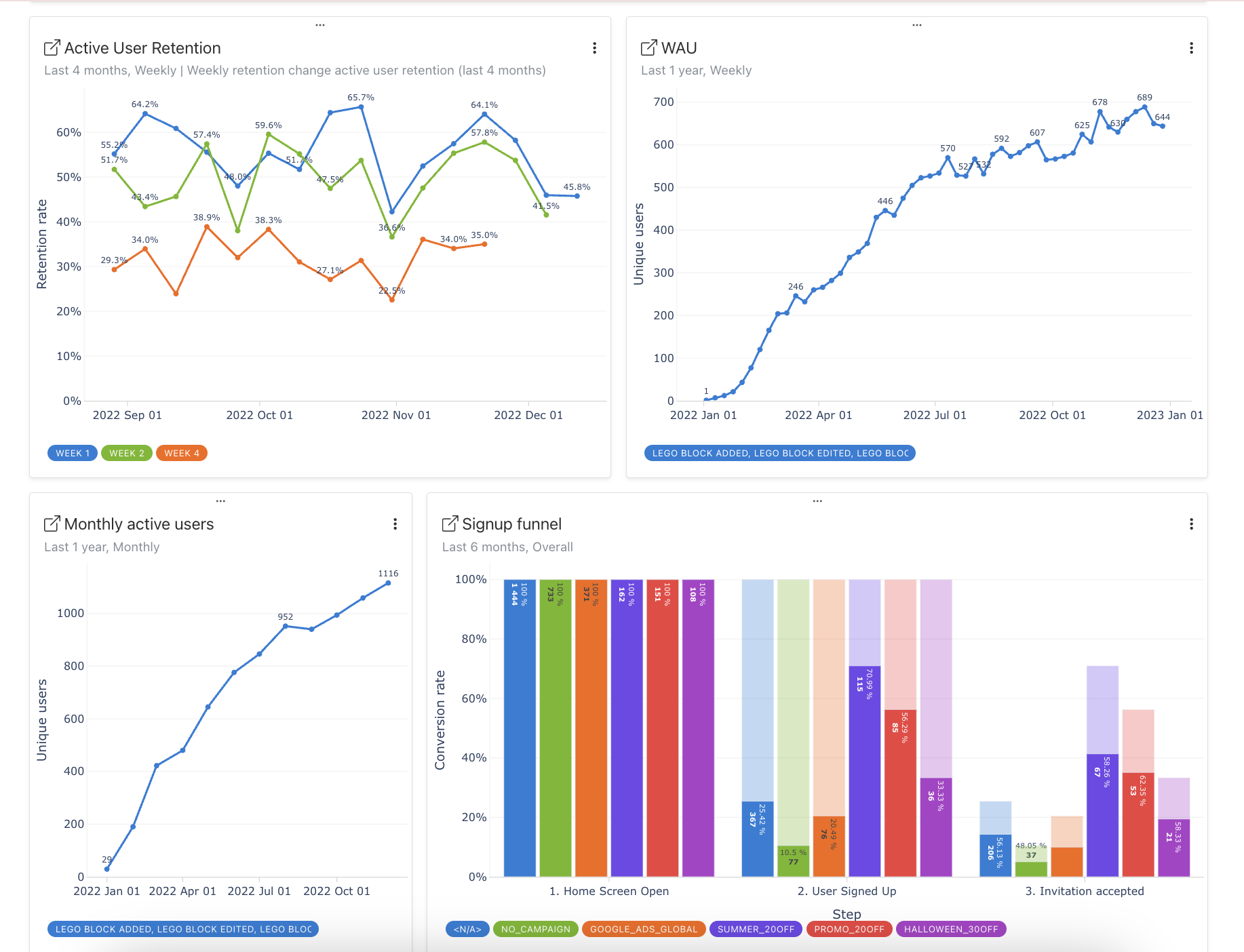
Mitzu dashboards
Mitzu dashboards offer real-time, drag-and-drop insights with auto-generated SQL, embeddable in Notion or Miro, and exportable as needed.
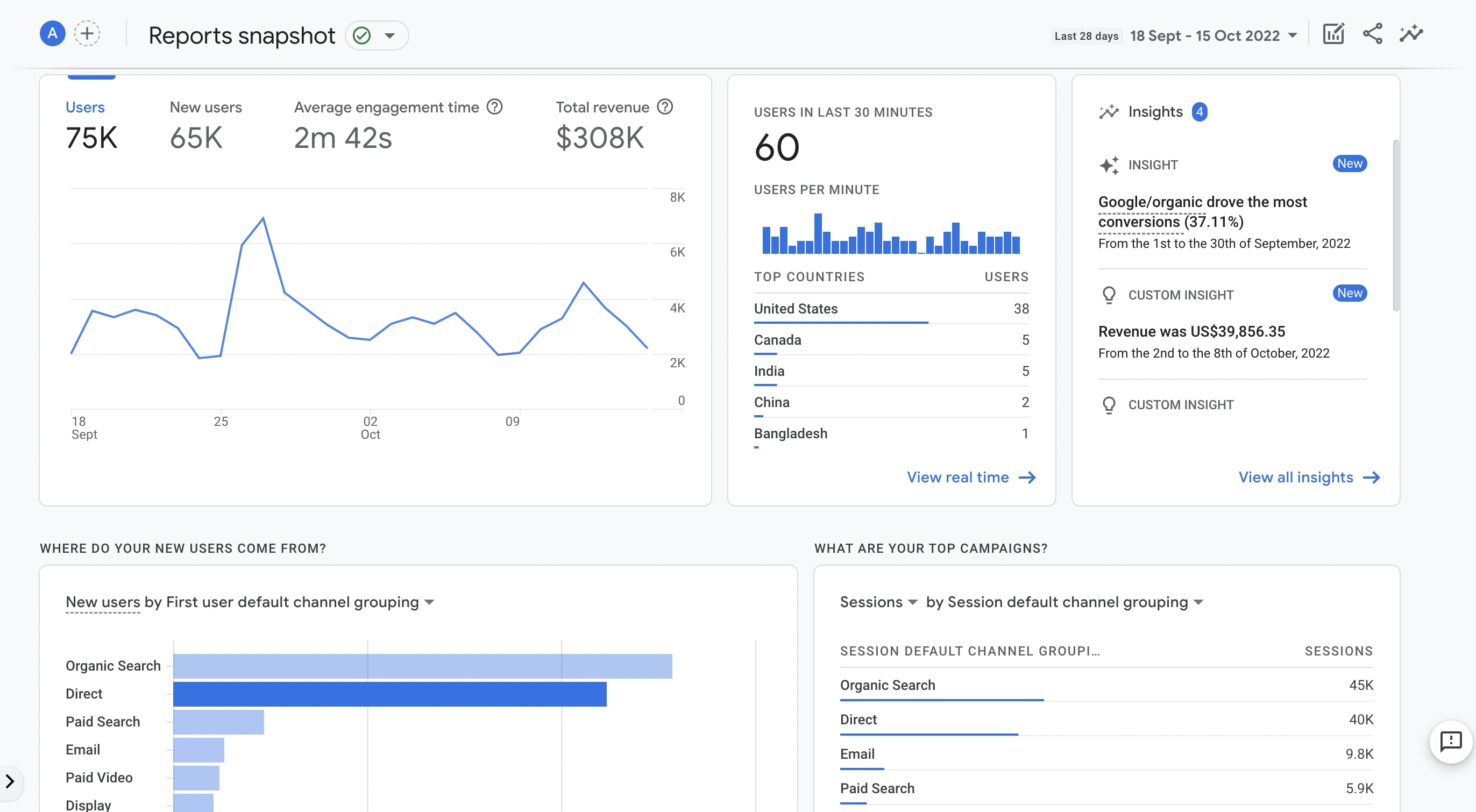
GA4 Dashboards
Feature pre-set visualizations, attribution panels, and standard Ecommerce/Acquisition/Realtime reports.
4. Event Tracking & Schema
GA4 via GTM (Google Tag Manager)
javascript// GA4 - Web Tag gtag('event', 'purchase', { value: 23.07, currency: 'USD', product_id: 'A123', method: 'credit_card' });Notes:
- Event parameters must be pre-registered in GA4 UI for custom dimensions.
- Advanced event modeling (e.g., arrays, nested objects) is not supported.
Mitzu
Event tracking is available with 3rd-party solutions like Snowplow / RudderStack or similar solutions.
Notes:
- Schema is user-defined in your data warehouse, enabling full support for nested, high-cardinality data.
- No need to predefine properties in UI; auto-detected from schema.
5. Data exports
GA4:
- Export: Set up BigQuery export in property settings.
- Querying: Only GA4’s BigQuery schema is available, a denormalized event table per day per property.
Sample SQL for extracting recent purchases from BigQuery GA4 export:
SELECT user_pseudo_id, event_timestamp, event_params
FROM `myproject.analytics_123456789.events_*`
WHERE event_name = 'purchase'
  AND _TABLE_SUFFIX BETWEEN '20260701' AND '20260714'
LIMIT 1000;
Limitations: Not real-time (batch export) in free tier, and BigQuery billing applies to queries/storage.Mitzu:Mitzu makes it easy to export insights from your event data:
- CSV Exports: Download query results directly from the Mitzu UI in CSV format for quick sharing or offline analysis.
- Data Writebacks (Work in Progress): Mitzu can write data back into your data warehouse by creating Views based on your queries. These views stay synced and always reflect the latest data.
- Data warehouse connections: Google BigQuery, Snowflake, Amazon Redshift, Databricks, Microsoft Fabric, ClickHouse, Presto, Amazon Athena, PostgreSQL
Mitzu’s exports ensure data stays in your data warehouse with no duplication or movement.
6. Privacy, security & compliance
Mitzu
- Data remains in your data warehouse or data lakes; no data leaves your data stack.
- Supports encryption at rest/in transit, column-level masking, customizable access roles, and audit trails.
- Self-hosting capabilities are present. You can deploy Mitzu in your own cloud environment.
GA4
- Data stored and processed by Google; subject to Google’s privacy policy and cross-border transfer policies.
- Supports IP anonymization, IP masking, user deletion API, and built-in consent controls.
- Customers relying on the free tier have less granularity and flexibility over PII redaction and compliance workflows.
7. Use cases & suitability
| Scenario / Need | GA4 | Mitzu |
|---|---|---|
| Small website/blog | Easy, free, quick setup. UI oriented for marketers. | Overkill; better suited for large datasets. |
| Large SaaS or B2B product | Lacks advanced journey/retention/product analytics. | Built for product analytics, advanced cohort analytics, funnels, and retention. |
| High data cardinality/complexity | Limits on parameters, sampling at scale. | Unlimited complexity, no sampling, full SQL flexibility. |
| Advanced analytics/ML integration | Possible with BigQuery, but batch/lagged; paid limitations. | Native, use the same warehouse for analytics, ETL, CDP or reverse ETL. |
| Advanced inbuilt analytics capabilities | Basic built-in reports; advanced requires BigQuery. | Full inbuilt analytics; self-serve and code-based analytics unified. |
| Privacy & compliance focus | Some anonymization; limited local options. | Full isolation; no data sharing; 100% privacy and compliance friendly. |
| Data team with SQL skills | Only via BigQuery export; not real-time. | SQL-first; ad hoc, no-code and code-based queries. |
| Marketing attribution | Strong with Google Ads; limited customization. | Custom models; not ad-centric, but broader view. |
| Non-technical stakeholder access | Prebuilt dashboards easy for basic overview. | Drag-and-drop, no-code UI for custom analysis. Self-service. |
| Long-term event history | 14mo cap in GA4; must export/archive. | Retention limited only by warehouse scale/costs. |
8. Conclusion & recommendations
- Choose GA4 if:You require zero-cost, immediate analytics setup for basic web/app activity.
- You rely on Google’s ecosystem for marketing, ads, and simple attribution.
- Your organization does not need ultra-deep event data or bespoke queries.
- Data quality, privacy, and fine-grained control are paramount (e.g., healthcare, fintech, enterprise SaaS).
- You require advanced segmentation, funnel, user journey and retention analysis at any historical scale.
- Product teams and data engineers need granular access to every tracked event for analytics, ML, or compliance.
- You want to leverage your warehouse as the analytics source of truth, avoiding data movement/silos.
javascript// GA4 - Web Tag
gtag('event', 'purchase', {
  value: 23.07,
  currency: 'USD',
  product_id: 'A123',
  method: 'credit_card'
});
SELECT user_pseudo_id, event_timestamp, event_params
FROM `myproject.analytics_123456789.events_*`
WHERE event_name = 'purchase'
AND _TABLE_SUFFIX BETWEEN '20260701' AND '20260714'
LIMIT 1000;