TL;DR
Memory is a set of short topics the Mitzu agent keeps across chats, such as how your team defines an active user or your usual time range. Topics are personal, or shared with the workspace and changed only by its admins. It replaces custom instructions. The agent saves when you ask it to remember something, correct it, state a definition or repeat the same setup. A chip under the answer shows every save with Undo, and Used memory lists the topics an answer relied on. Memory works in the web chat, Slack, MCP clients and the Configuration Agent. Scheduled agents read the memory of the person who created them and never change it.
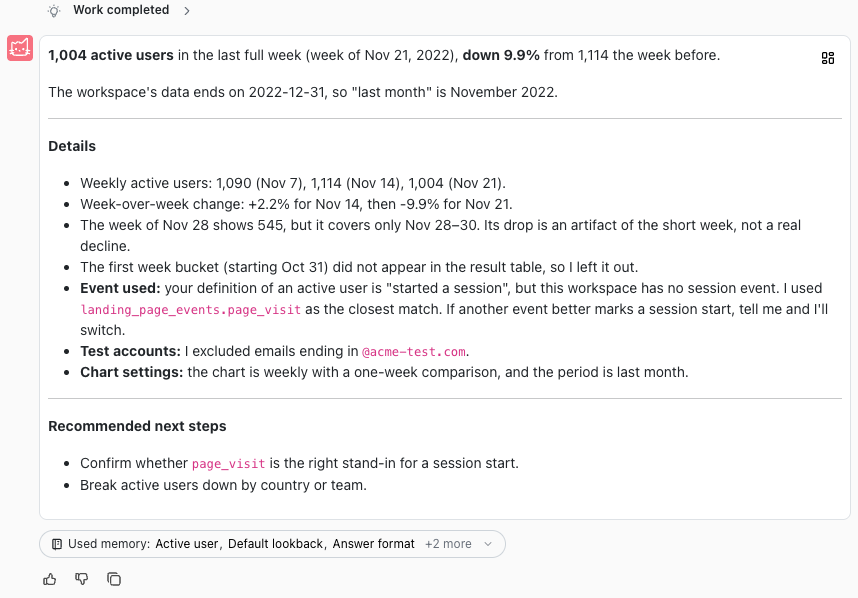
Memory is new in Mitzu: the analytics agent now remembers your definitions, defaults and preferences across chats, and applies them without being asked. You tell it once that an active user is anyone with a page visit, or that you want weekly charts, and every later answer uses it. You see what it saved and what it used, and you can edit or undo any of it.
Memory replaces custom instructions. Workspace instructions become workspace memory, and personal AI instructions become personal memory, so nothing you wrote before is lost. Memory is rolling out workspace by workspace, and the Memory documentation covers every detail.
The case for memory
An analytics question carries context that never makes it into the words. When a product manager asks how many active users the product had, they mean their team's definition of active, the time range they always look at, and without the internal test accounts. Without memory, they type all of that into every chat, or they get an answer that is correct for a different question.
- People repeat themselves. The same time range, the same exclusions and the same definition of a metric get typed again in every chat, by every person on the team.
- Settings pages go unwritten. Mitzu already had custom instructions in workspace and personal settings. About one workspace in a hundred had written workspace instructions, and nobody had written personal ones. People don't leave the question they are working on to document their preferences somewhere else.
- People were already asking. Users told the agent to update its own instructions in the middle of a chat, because that is where they noticed the agent needed to know something.
- The team's definitions belong to the team. When one person corrects how activation is counted, the rest of the workspace should get the same answer, but only after someone accountable for the definition agrees.
So memory comes from the conversation. The agent decides what is worth keeping as part of answering, saves it in the same turn, and shows the save under the answer with an Undo. Nothing is hidden: every topic is a short piece of text you can open, edit or delete.
The people memory is for
- Everyday users: product managers, marketers, growth, operations and finance people who ask the agent questions every week and want it to know how they work: their usual time range, chart granularity and answer format.
- Data leaders and workspace admins: the people accountable for definitions. Workspace memory lets them write down what an active user, a paying customer or a test account is once, and have every answer in the workspace use it.
- Teams that ask outside the app: the same memory applies when someone asks in Slack or from Claude, ChatGPT or Cursor through the MCP server, and when a monitoring agent runs on a schedule.
Topics, scopes and the index: how memory works
Memory is a list of topics. Each topic has a title, a one-line summary that carries the key fact, and optional details for exceptions and examples. One topic holds one subject: an active user definition, a default lookback, a list of accounts to exclude.
Personal and workspace memory
| Personal memory | Workspace memory | |
|---|---|---|
| Belongs to | You | Everyone in the workspace |
| Applies in | Every workspace of your organisation | This workspace |
| Who sees it | Only you; admins can't view it | Everyone in the workspace |
| Who changes it | You, or the agent on your behalf | Workspace Admins and Workspace Owners |
| Good for | Your defaults and how you like answers | Definitions, exclusions and team conventions |
Because personal topics follow you across workspaces, the agent names the workspace in a personal topic that only holds in one place, such as an event name, so it doesn't mislead you somewhere else.
Memory inside an answer
- With every question, the agent sees the summary line of every topic you can see. That index is read fresh for each turn, so a topic you just edited or deleted is reflected at once.
- When a topic bears on the question, the agent opens it and reads the full text, including any exceptions in the details.
- It applies the topic without being asked, and says so in a few words, for example "using your default of the last month".
- Used memory under the answer lists the topics it opened: the first three, then +N more. Click a title to open the topic.
Memory changes what the agent asks for, not how numbers are calculated. The analytics agent still builds an analysis specification, and Mitzu's deterministic query engine turns it into SQL. A remembered definition shows up in the specification and the SQL like any filter or event you picked yourself, so you can review it in the answer.
Topics a person wrote stay theirs
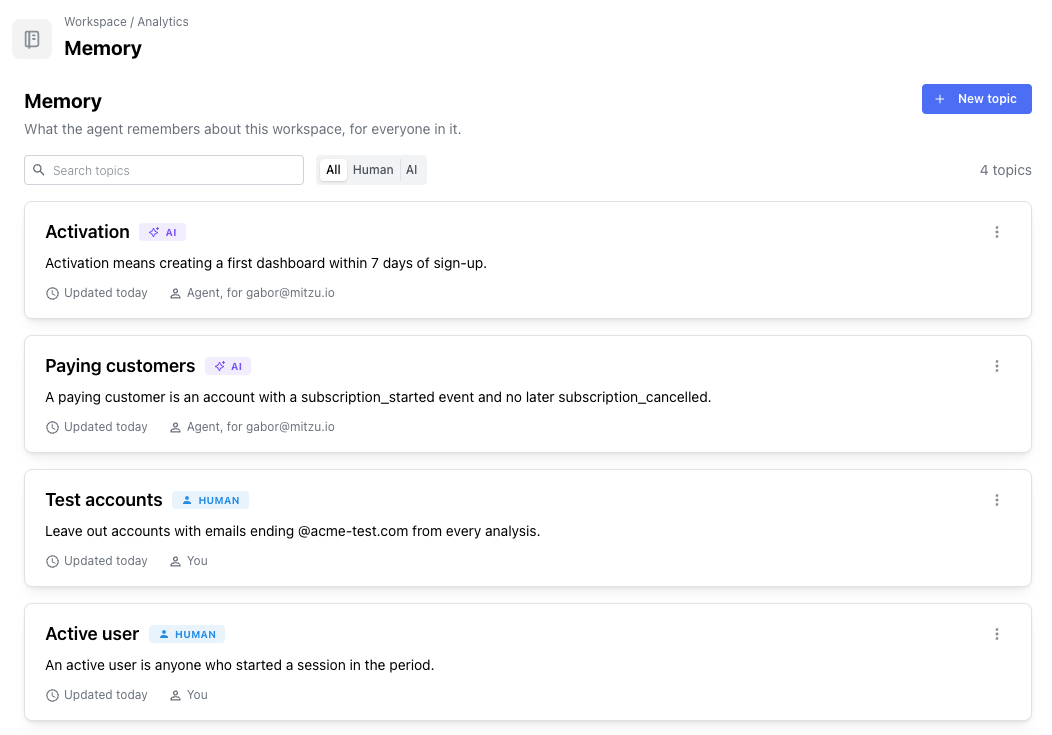
Every topic carries a Human or AI badge. The agent changes or removes a topic a person wrote only when someone asks it to, or confirms the change on a card. When what you say contradicts a human-written topic, the agent answers your way and then offers the update on a card instead of overwriting it. Editing a topic the agent wrote makes it human-written for good.
Memory in each workflow
Memory is shared by every agent surface in Mitzu, so a definition saved in a web chat applies when the same person asks in Slack the next day.
| Workflow | Reads memory | Saves to memory | How you see it |
|---|---|---|---|
| Analytics agent in the web chat | Yes | Yes | A chip under the answer for every save, update and removal, with Undo; Used memory lists the topics it opened |
| Slack | Yes | Yes | The answer says what it saved, updated or removed, with the topic title and whether it is personal or workspace memory |
| MCP clients (Claude, ChatGPT, Cursor) | Yes | Yes | Same as Slack: reported in the answer text |
| Configuration Agent | Yes | Yes | Same as the analytics agent in the web chat |
| Scheduled agents | Yes, the creator's personal memory and the workspace memory | No | Runs use what is there and never change it |
- Web chat. The full experience: chips with Undo and Edit, the workspace confirmation card, Used memory, and the Memory button in the chat input. Chips and markers are rebuilt from the stored conversation, so they are still there when you reopen a chat. If you undo a save, the next turn knows it.
- Slack and MCP. These surfaces show no chips, so the agent states in its answer what it saved. Memory acts with your role in the workspace, so an admin asking from Claude can save workspace memory and a member can't. See Mitzu's MCP server for the setup.
- Configuration Agent. Reads and saves memory the same way as the analytics agent, so a convention agreed while setting up events or metrics is available in later analysis.
- Scheduled agents. A monitoring agent runs with nobody watching, so it reads memory but never writes it. Each run uses the workspace memory and the personal memory of the person who created the agent: a weekly report uses its owner's default exclusions without them being repeated in the prompt.
Creating a memory topic, step by step
There are three ways a topic gets into memory: you ask the agent, the agent picks it up from the conversation, or you write it yourself in settings.
Option 1: Ask the agent to remember it
Say it the way you would to a colleague: "Remember that I want weekly charts unless I say otherwise." The agent saves it to your personal memory and shows a chip under the answer naming the topic. Click the title to open it, or Undo to take it back.
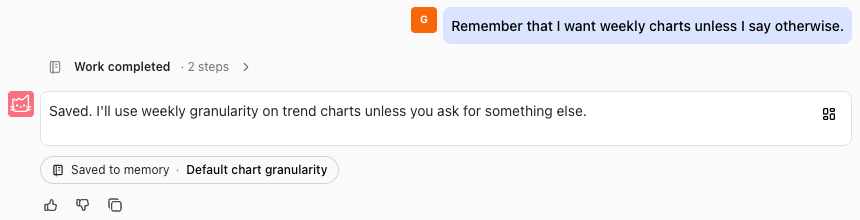
To remove a topic the same way, ask: "Forget the weekly chart default." The agent removes it, and the chip says so, again with Undo.
Option 2: Let the agent pick it up
The agent also saves on its own when you correct how it did something ("No, activation means connecting a data source"), state a definition, or repeat the same setup across questions. Facts about the team follow the workspace rules: when an admin says "remember for everyone that trials last 14 days", the agent saves it to workspace memory straight away. When it picks up a team fact any other way, such as "our fiscal year starts on 1 April", it asks first on a card.
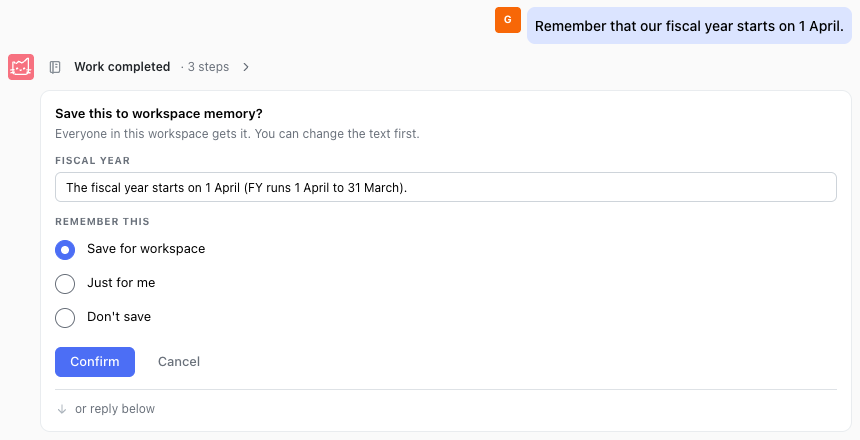
When someone who can't change workspace memory asks the agent to remember something for the team, it explains that admins manage workspace memory and offers to save it just for them.
Option 3: Write the topic yourself
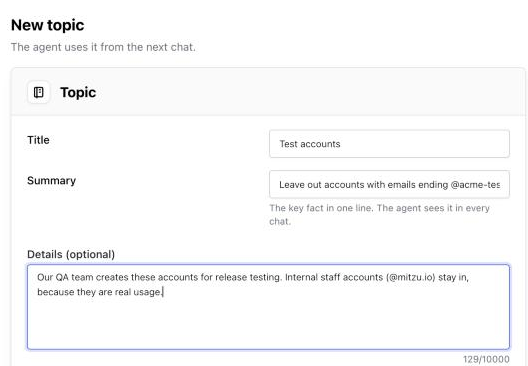
- Open Settings → Workspace → Analytics → Memory for a workspace topic (Workspace Admins and Owners), or Settings → Personal → Memory for a personal one.
- Click New topic.
- Give it a short Title, such as Test accounts.
- Write the Summary: the key fact in one line. This is what the agent sees with every question, so put the rule itself here, not a description of it.
- Add Details if the rule has exceptions or needs examples. The agent reads them when it opens the topic.
- Click Save. The agent uses the topic from the next chat, and it carries a Human badge.
The same page lists every topic, with search and a Human or AI filter, so an admin can review what the agent has saved for the workspace.
Viewing and editing memory from the chat
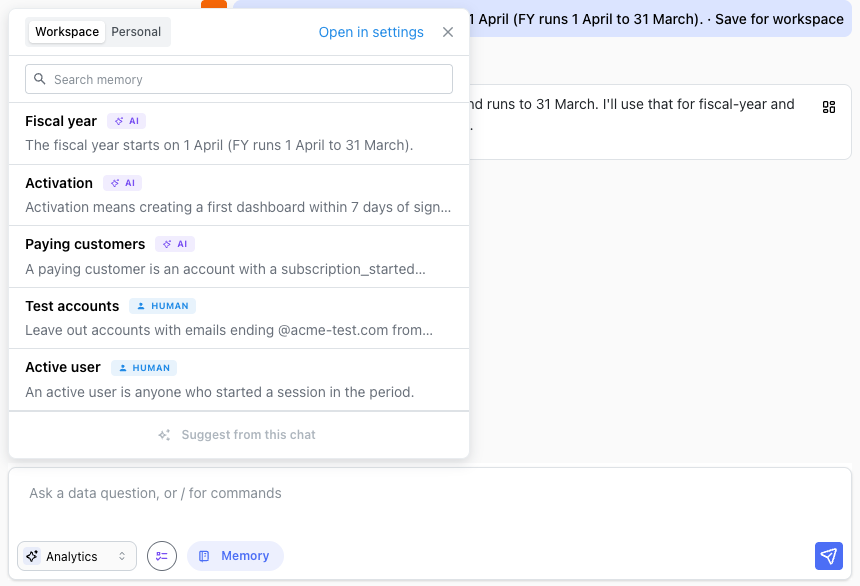
You don't have to leave the conversation to check what the agent knows. The Memory button in the chat input opens your memory: switch between Workspace and Personal, search, and open a topic to Edit or Delete it. Open in settings takes you to the full list. Changes apply from the next chat.
Things memory doesn't keep
- One-off filters. "Show signups for Germany only" is a question, not a preference, so nothing is saved.
- Anything that only applies to the question at hand, and anything already in memory: the agent updates the existing topic instead of saving a duplicate.
- Credentials and personal data. The agent doesn't save passwords, keys or personal information.
- Your data. Memory holds short text you or the agent wrote. Raw event data stays in your warehouse, as it does for the rest of Mitzu.
Privacy: what is stored and who sees it
Personal topics are visible only to the person they belong to; when someone else opens your chat, the chips and Used memory don't show your personal topics to them. Workspace topics are visible to everyone in the workspace. The summary of every topic you can see goes to the model with each question, and the full text of the topics the agent opens; like the rest of the conversation, it is never used for training.
Every change to a topic, including a deletion, is stored as a new version with who made it and when. Memory is stored in Mitzu's encrypted database, and it is deleted with the workspace, or with the person when they leave the organisation. The Data & Privacy page has the full detail.
Availability and what's next
Memory is rolling out workspace by workspace. Where it is on, custom instructions are already moved into memory and the agent no longer reads the old instructions. Suggest from this chat, a button in the memory popover that reads the conversation and proposes topics for you to tick and save, is coming next.
FAQ
What is agentic memory?
Agentic memory lets an AI agent keep information across conversations and decide for itself what to save, update, use and forget. In Mitzu, the agent keeps short topics, such as definitions, defaults and preferences, applies the ones that bear on each question, and shows every save and use under the answer.
What happened to custom instructions?
Memory replaces them. Workspace custom instructions become topics in workspace memory, and personal AI instructions become topics in your personal memory, written as human topics. Where memory is on, the agent reads memory instead of the old instructions.
Can the agent change a definition my data team wrote?
Not on its own. Only Workspace Admins and Owners can change workspace memory, and a topic a person wrote changes only when someone asks for that change or confirms it on a card. Every change is kept as a version with who made it.
Does memory override what I ask for?
No. A choice in your question always wins over a saved default. Memory fills in what the question leaves out, such as the time range or which accounts to exclude.
Do Slack, MCP and scheduled agents use the same memory?
Yes. Slack and MCP clients read and save memory with your role in the workspace and report saves in the answer text. Scheduled agents use the workspace memory and the personal memory of the person who created them, and never change it.
Is my memory used to train AI models?
No. Topic summaries and the topics the agent opens are sent to the model with your question, like the rest of the conversation, and are never used for training.
Related reading
- What is an analytics agent?
- Why analytics agents need a semantic layer
- Planning mode for analytics agents
- Mitzu's MCP server