TL;DR
Experiments analyses the A/B tests you already run, directly on your data warehouse: Mitzu reads the exposure event your experimentation tool leaves behind, with no SDK and no data copies, and never assigns users or touches feature flags. Every experiment metric is a saved Mitzu insight, so a test is judged on the same definition of conversion or revenue your dashboards show, with guardrail metrics that must not get worse. Each evaluation gives a verdict with lift, interval and p-value; health checks such as sample ratio mismatch withhold it when the test is broken, and finalizing records the decision, cohorts and roll-out annotations.
Experiments is new in Mitzu: run and read A/B tests directly on your warehouse data, with no extra tracking or data copies. It is built for product managers, growth teams and the analysts who support them, at companies whose event data already lives in Snowflake, BigQuery, Databricks, Redshift, ClickHouse or a similar cloud warehouse.
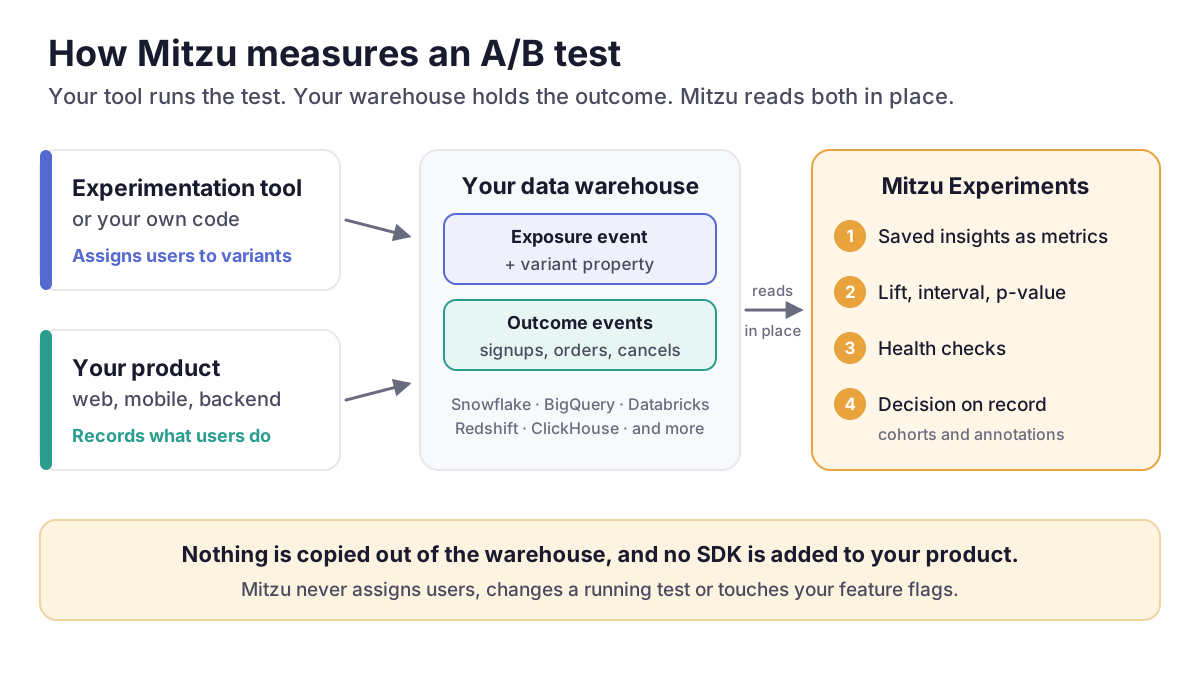
You keep running tests the way you do today: an experimentation or feature-flag tool, or your own code, decides who sees which variant. Mitzu reads the exposure event that tool leaves in your warehouse, measures every variant with the saved insights your team already uses, checks whether the test itself can be trusted, and records what you decided. It is the first of five releases in Mitzu Launch Week.
1. Why we built Experiments
An A/B test has two halves. One tool decides who sees which variant. The data that says whether the change worked, such as signups, purchases, documents created and cancellations, usually lives somewhere else: in your data warehouse, next to everything else your company knows about its customers. Teams kept telling us the same four things go wrong in the gap between those halves.
- The tool that runs the test sees only part of the picture. It measures the events you send to it. The metrics the business is run on, such as revenue per customer, trial-to-paid conversion, retention and support tickets, are built in the warehouse from many sources, and most of them never reach the testing tool.
- Two definitions of the same metric disagree. When "conversion" is defined once in the testing tool and again on the company dashboard, the test can win in one place while the dashboard stays flat in the other. Nobody trusts either number.
- Every test becomes a one-off analysis. An analyst writes new SQL for each test: who was exposed, which variant they saw, how many converted, a significance test. The work is slow, hard to review and hard to repeat.
- Decisions get lost. Months later, nobody remembers why the old checkout was kept, which variant won the pricing test, or whether the redesign was tested at all.
Experiments closes that gap where the data already lives. It is the same idea behind everything Mitzu does as an agentic product analytics platform: the analysis runs on your warehouse, uses your definitions, and the SQL comes from a deterministic query engine, not from a hand-written script per test.
2. What you get
| Benefit | What it means in practice |
|---|---|
| Your metric definitions | An experiment metric is a saved insight, the same funnel or segmentation your dashboards show. Fix a definition once and the next evaluation of every experiment that uses it picks it up. |
| Your data, in place | Exposure, variants and outcomes are read from your warehouse with the same queries as the rest of Mitzu. Nothing is copied out, and no SDK is added to your product. |
| A verdict you can trust | Each result comes with a significance test, a confidence interval, an optional correction for testing many metrics at once, and health checks that withhold the verdict when the test is broken. |
| Business metrics, not just clicks | Because the outcome is anything in your warehouse, a test can be judged on revenue per user or trial-to-paid conversion, with cancellations or refunds as guardrails. |
| A record of every decision | Finalizing stores the outcome, the decision, a written summary and the exact results it was based on. Anyone can look it up later. |
| Tests feed the rest of your analysis | Each variant's users can be saved as a cohort, and the test window and roll-out can be marked on every chart as annotations. |
3. What Experiments does, and what your tool keeps doing
Experiments analyses tests; it does not run them. Keep using your experimentation tool or your own code for assignment and roll-out. Mitzu only needs the record each one leaves behind.
| Your experimentation tool or code | Mitzu Experiments |
|---|---|
| Assigns users to variants and decides who is in a test | Reads the exposure event and the variant each user saw |
| Creates, changes and switches off feature flags | Measures every variant against the control on your saved insights |
| Sets the traffic split and stops a test | Checks the split you planned against the split you got |
| Ships the winner | Records the decision and marks the roll-out on your charts |
4. How it works: five stages
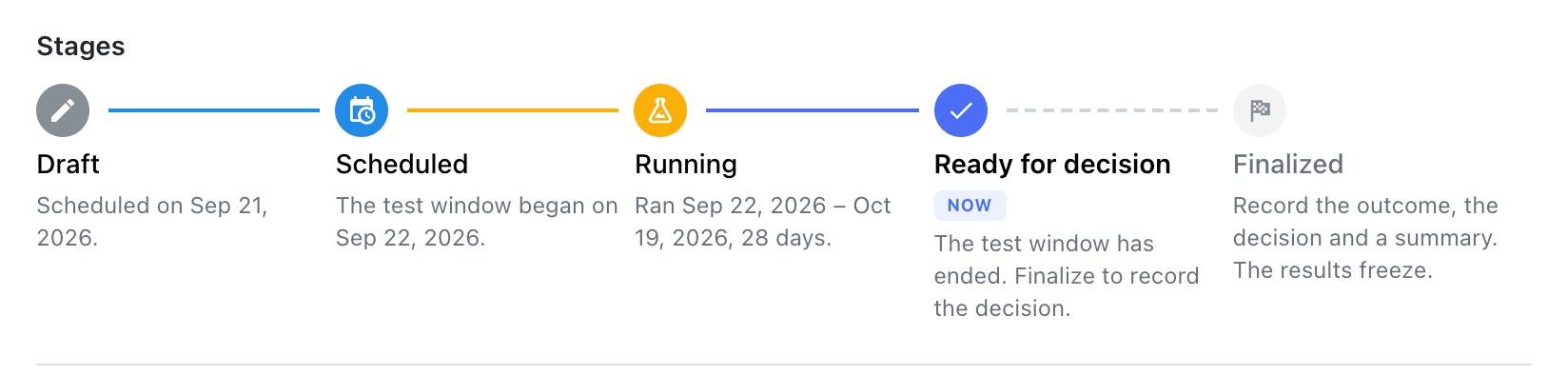
Every experiment moves through the same five stages, shown as a badge on the experiments list and as a timeline on the experiment itself. Most stages follow from the calendar and from the results you compute; only scheduling, finalizing and archiving are things you do yourself.
| Stage | What happens |
|---|---|
| Draft | You describe the test. Everything can be edited, and a progress line says what is still missing, for example a primary metric or an end date. |
| Scheduled | Scheduling locks the definition: population, metrics, statistics settings, sample plan, variants and test window can no longer change. |
| Running | The test window is open. You can evaluate as often as you like, but results are marked incomplete and carry no verdict yet. |
| Ready for decision | The window has ended and the results cover every day of it. Mitzu re-evaluates on its own the morning after the end date and emails the owner. |
| Finalized | You recorded the outcome, the decision and a summary. The results are frozen with the decision. |
The lock at scheduling is deliberate. Once results start coming in, it is tempting to swap the primary metric for the one that looks best, or to stop the test the day it crosses the line. Locking the definition before the data arrives keeps the analysis honest without anyone having to police it.
5. Step by step: from exposure event to decision
Step 1: Check that your warehouse has what Experiments needs
Before you create an experiment, check for three things:
- An exposure event in one of your event tables, recorded when a user enters the test, for example
Experiment Viewed,experiment_exposureor a feature-flag evaluation event. - A variant property on that event whose value says which variant the user saw:
control,treatment,A,B. Among exposed users it needs between 2 and 10 values. - Outcome events for the same users, recorded with the same user identifier as the exposure event, so Mitzu can follow each exposed user to what they did next.
A quick sanity check: open a segmentation insight, pick the exposure event, break it down by the variant property and count unique users over the test window. You should see one bar per variant, roughly in the proportions the test was set up with. Log exposure when the user actually experiences the variant, not when they are assigned; otherwise users the change could never have affected dilute the effect.
Step 2: Describe the test and its population
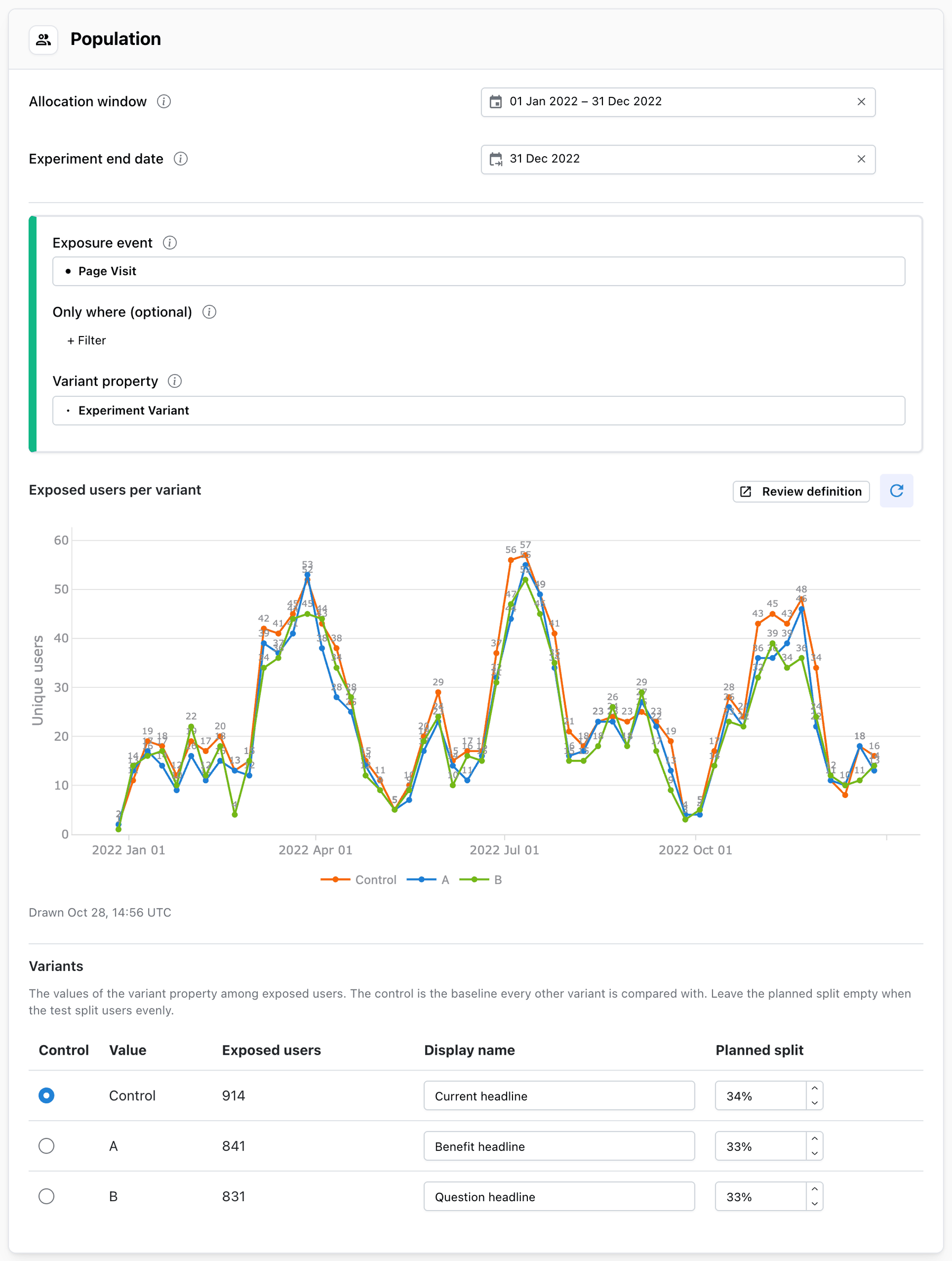
Click New experiment, give it a name and a hypothesis, then set the population: the allocation window, the end date, the exposure event, an optional Only where filter (for example experiment_id is checkout-redesign when one event carries every test) and the variant property. Mitzu draws Exposed users per variant right in the form, lists the variants it found, and lets you pick the control, give each variant a display name and set the planned split.
Step 3: Pick metrics from your saved insights
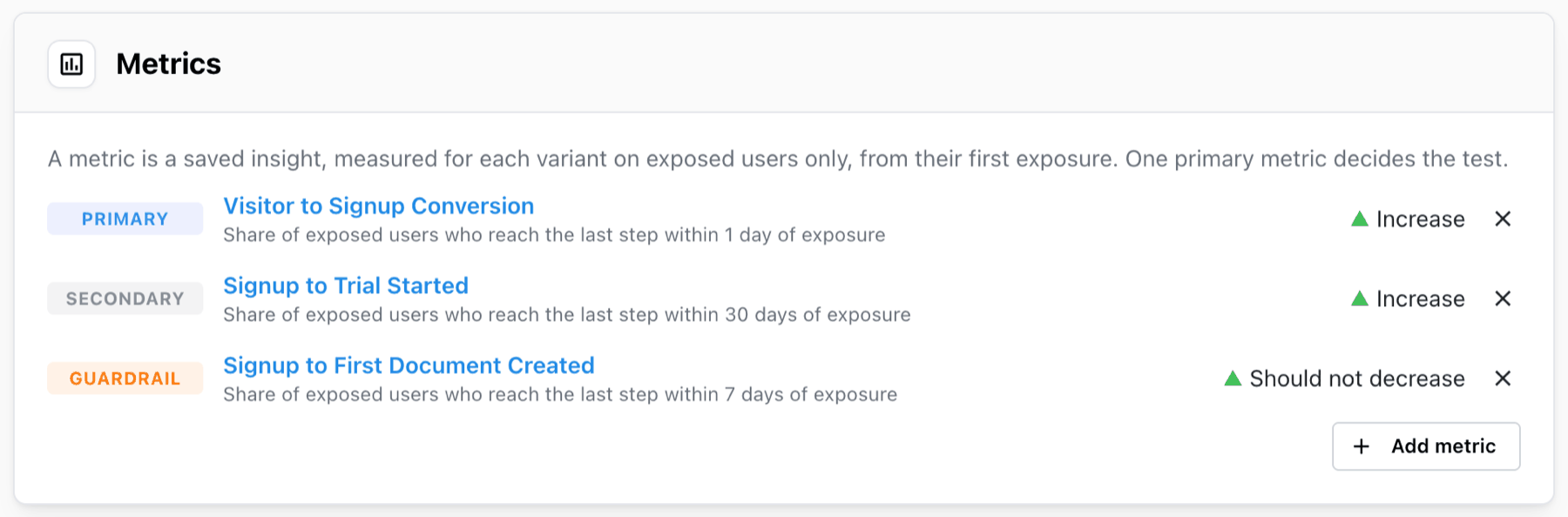
Add metrics with Add metric. Each one is a saved insight with a role and a direction that counts as good. Mitzu puts the exposure event in front of the insight's own steps and counts only what happens after each user's first exposure.
| Role | What it does | Typical example |
|---|---|---|
| Primary | Decides the test. Exactly one per experiment. The verdict, the sample plan and the traffic split check are all about this metric. | Signup to trial started conversion |
| Secondary | Supporting evidence: shown with a significance test, but doesn't change the verdict. | Revenue per user, next funnel step |
| Guardrail | Must not get worse. Shows Within guardrail or Guardrail breached; never wins. | Cancellations, refunds, support tickets |
Funnels measuring the conversion rate and segmentations that count unique users, count events, sum a property or divide two segments (A / B) can all be tested. To test average order value, for example, save a segmentation with the sum of revenue on order_completed as A, the count of order_completed as B and the formula A / B. Journeys and retention insights can't be experiment metrics yet; the picker greys them out and says why.
Step 4: Set the statistics and the sample plan
The defaults, 95% confidence and a two-sided test, suit a test with one treatment and one primary metric. Use 99% when the change is expensive or hard to reverse, such as pricing. Turn on the Holm correction when you compare several variants or will act on a secondary metric: test ten things at 95% and the chance that at least one looks significant by luck alone is about 40%. A sample plan tells you how many users each variant needs to detect the lift you care about, and the experiments list shows how far along each test is.
Step 5: Schedule it
Click Schedule experiment. The definition locks, and the experiment waits until the start date or goes straight to Running if the window has already started. The name, hypothesis, key, link and description stay editable. If you really need to change the definition, Back to draft unlocks it and hides the current results, so the next run starts clean.
Step 6: Evaluate and read the verdict
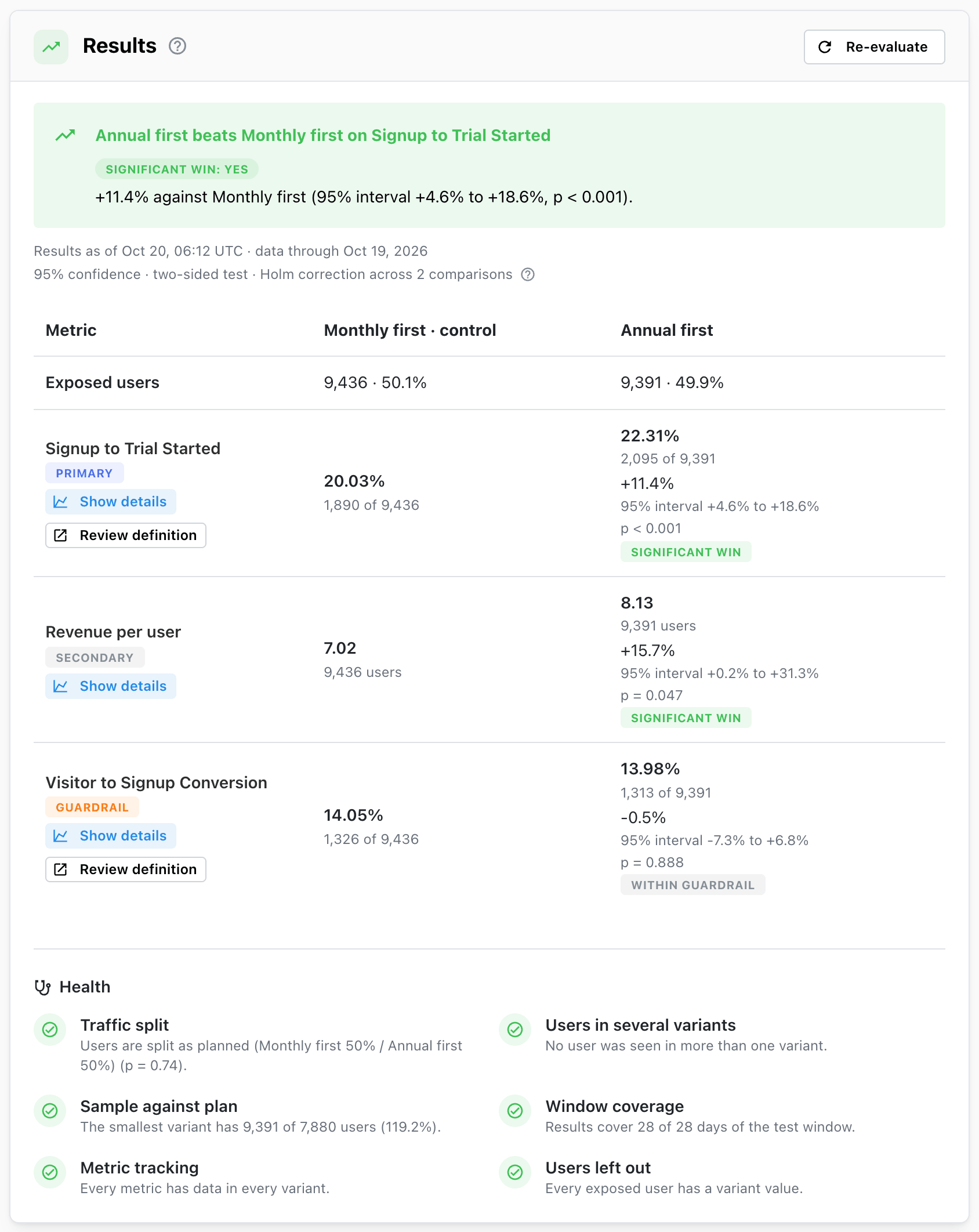
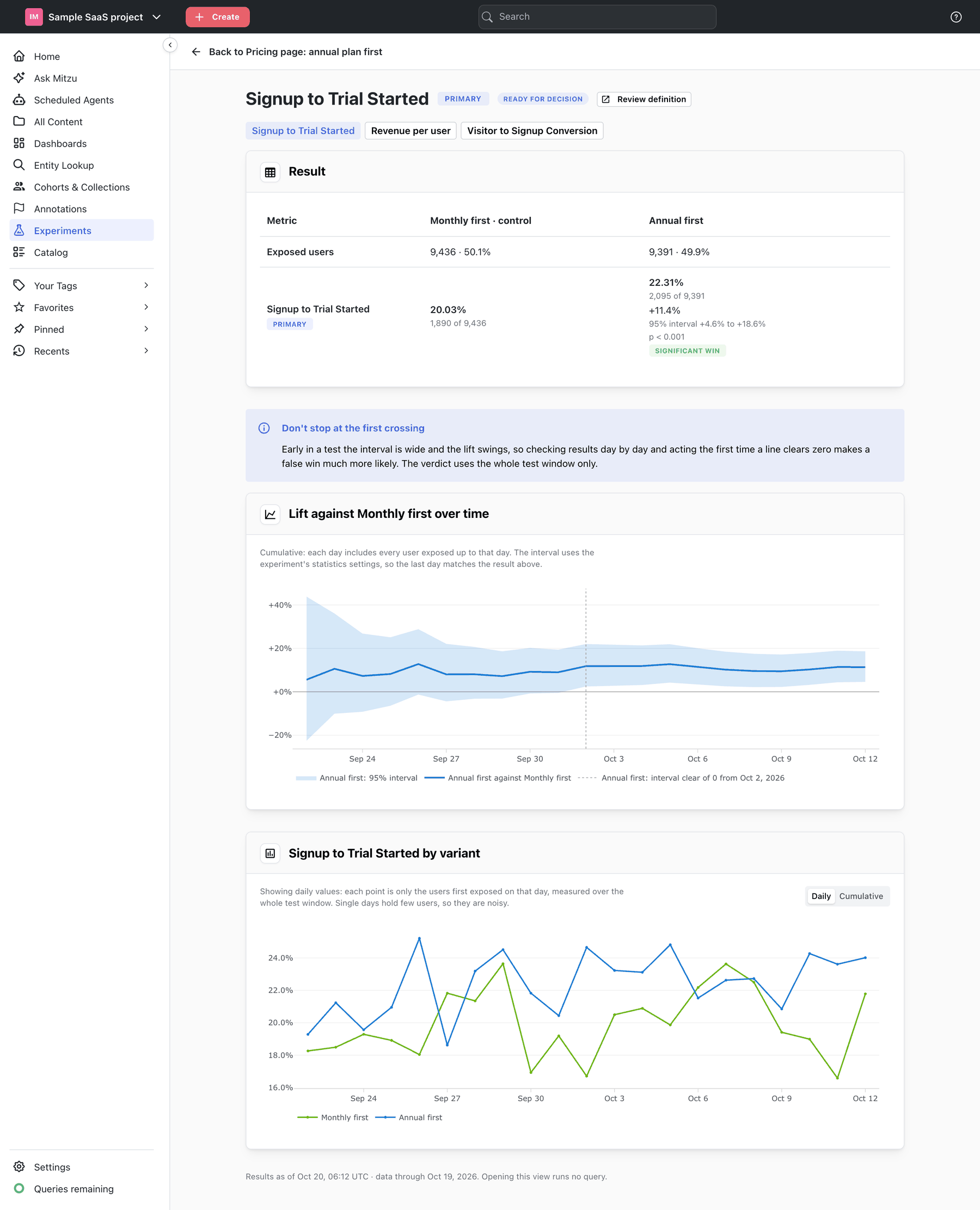
Nothing runs on its own while the test is in progress: results are computed when you press Evaluate. The Results card leads with the verdict on the primary metric, in plain words, for example Annual first beats Monthly first on Signup to Trial Started: +11.4% against Monthly first (95% interval +4.6% to +18.6%, p < 0.001). Below it, one row per metric shows each variant's value, lift, interval and p-value.
| Verdict | What it means |
|---|---|
| Significant win | A variant beats the control on the primary metric at the chosen confidence. |
| Significant loss | A variant does worse than the control on the primary metric. |
| No clear winner | No difference was large enough to be sure of. That is a useful answer too. |
| Inconclusive: sample too small | No clear winner, and the test stopped short of its planned sample, so a real lift could have been missed. |
| Verdict withheld | A health check failed, so the comparison is not trustworthy. |
Show details on any metric opens it over time: the lift against the control with its interval, day by day, and the metric itself per variant. You can see whether a lift held steady or came from one unusual week, and why stopping the first time a line clears zero is a trap.
Step 7: Check the health of the test
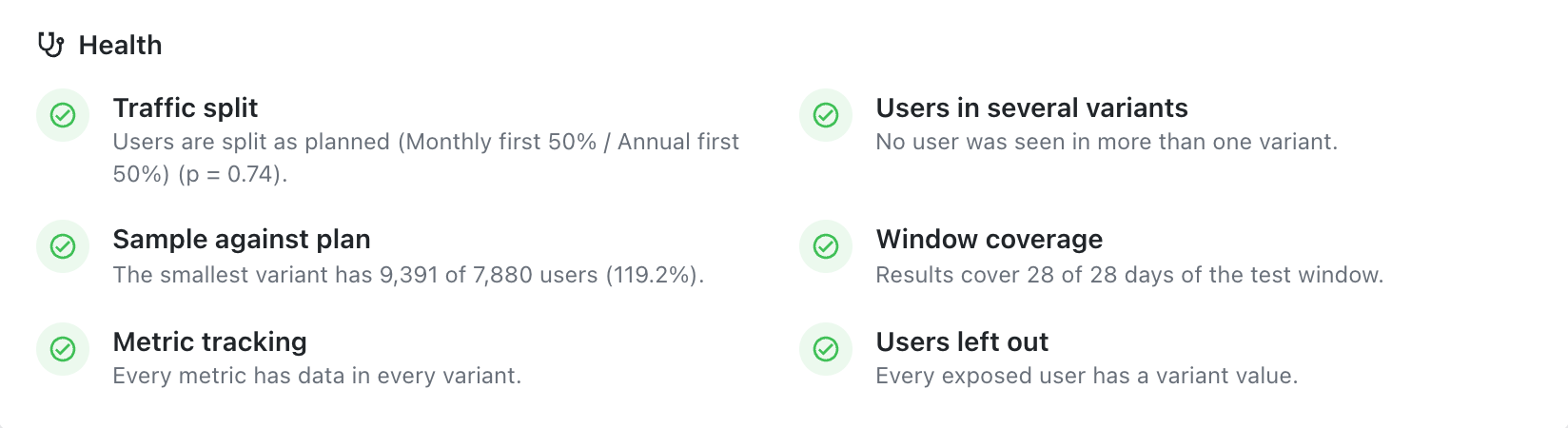
A verdict is only as good as the test behind it. After every evaluation, six health checks look at the test itself. The two assignment checks are strict: when either fails, Mitzu withholds the verdict instead of giving you a confident wrong answer.
| Check | What it catches |
|---|---|
| Traffic split | A sample ratio mismatch: the real split differs clearly from the plan (chi-square, p < 0.001). Usually a redirect that loses visitors, a bug in one variant, or exposure logged at different moments. Withholds the verdict. |
| Users in several variants | Users who saw more than one variant. Above 5% of all counts the groups are no longer independent. Withholds the verdict. |
| Sample against plan | Whether the smallest variant reached the sample plan. |
| Window coverage | Whether the results cover every day of the test window. |
| Metric tracking | A metric with no conversions in a variant, usually a tracking gap rather than a result. |
| Users left out | Exposed users without a variant value, often a platform or app version that doesn't send it. |
Step 8: Finalize and record the decision
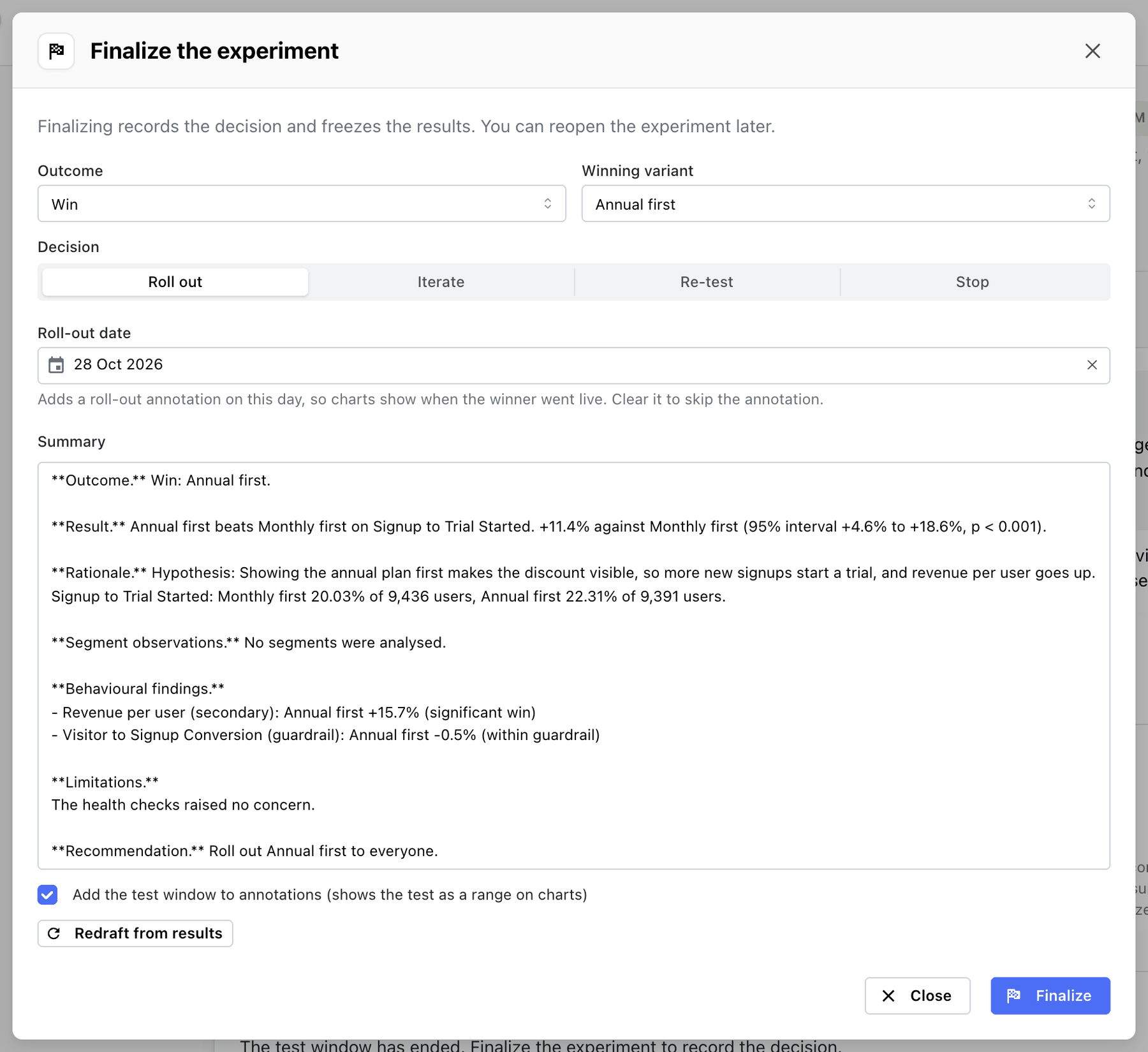
A test isn't finished when the numbers come in; it is finished when someone decides what to do about them. Once the experiment is Ready for decision, click Finalize. Mitzu suggests the outcome (Win, Loss, No clear winner, Inconclusive) and the decision (Roll out, Iterate, Re-test, Stop) from the results, and drafts a summary with the result, the rationale, behavioural findings on every secondary metric and guardrail, limitations from the health checks, and a recommendation. The decision is yours: edit anything, add the context only you have, and finalize. The results are frozen with the decision.
Step 9: Turn the result into follow-up analysis
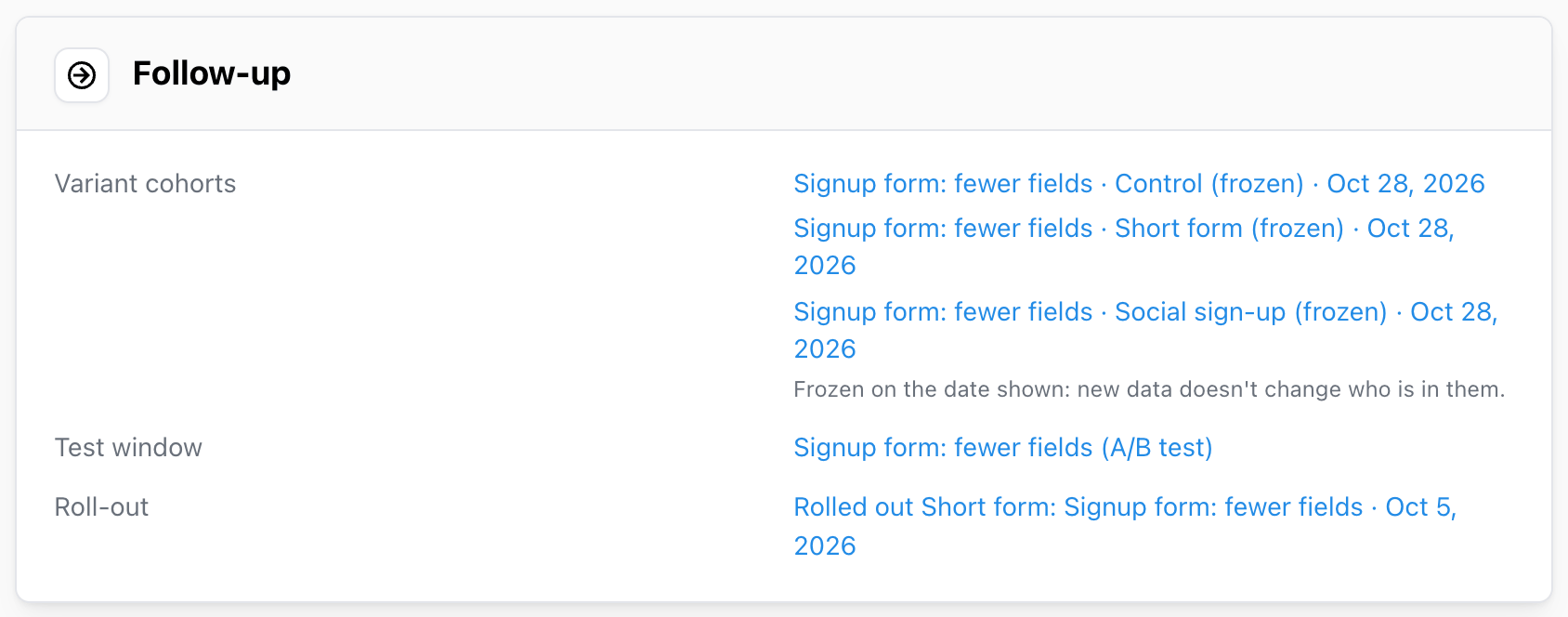
- Save variant cohorts. One frozen cohort per variant, holding the users exposed to it. Build a retention insight on them to see whether the winners still retain better three months later.
- Annotate your charts. The test window and the roll-out date appear on every chart in the workspace, so a step change on the company dashboard can be traced back to the test that caused it.
- Duplicate as follow-up. Start the next test from this one, with the same population, metrics and settings, to re-test an inconclusive result or try the next iteration of a winner.
6. Every test in one place
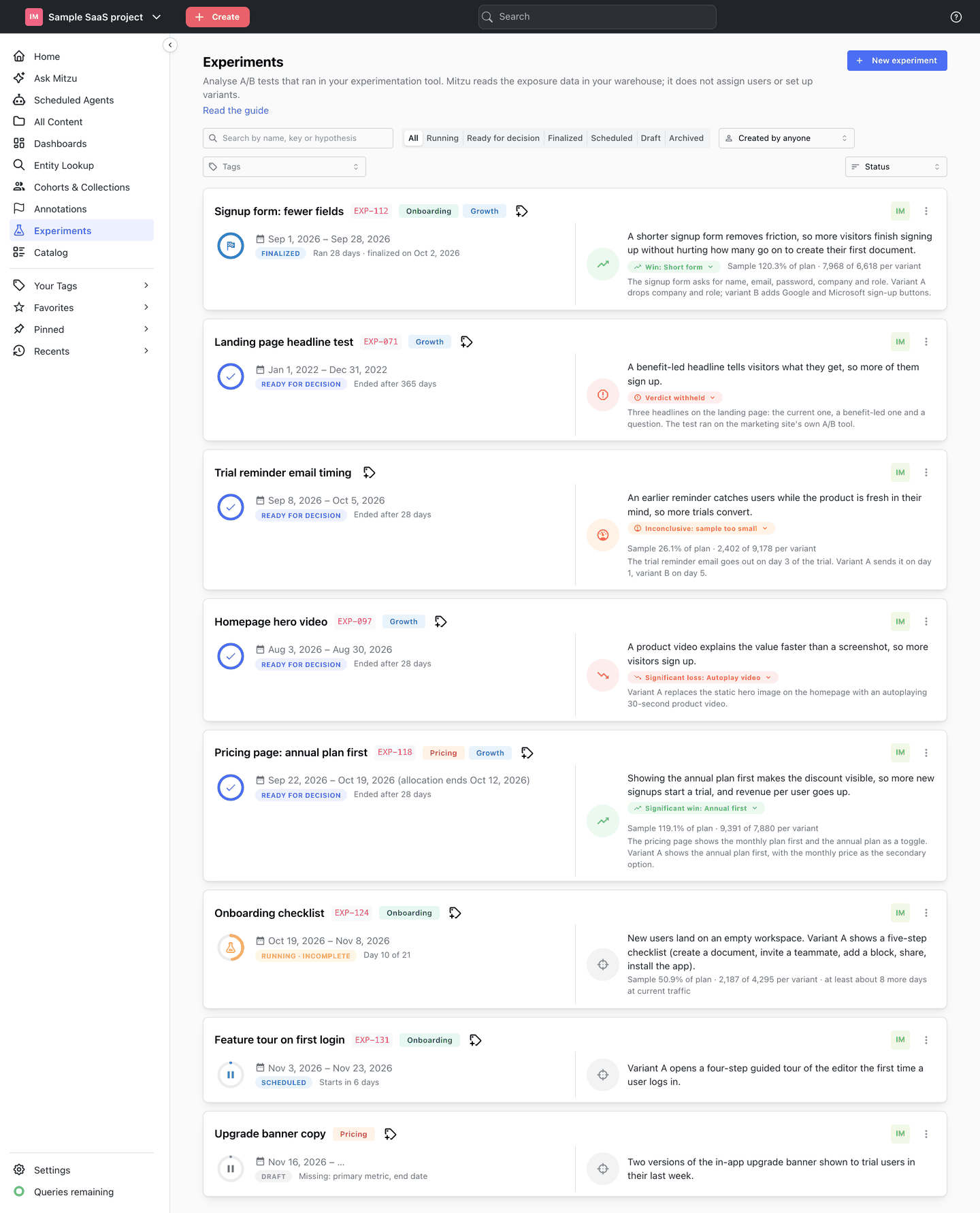
The experiments list shows every test with its stage, its verdict, the sample reached against the plan, and the hypothesis. Filter by stage, tag or owner, or search by name, key or hypothesis. It doubles as the team's decision log: what was tested, what won, and what was rolled out.
7. Who Experiments is for
- Product managers and marketers who run tests and need a clear answer in plain words, and a place to record the decision.
- Analysts and data teams who want every test measured the same way, on the same metric definitions, without writing SQL for each one.
- Leadership who want to see what was tested, what won and what was rolled out, without asking around.
8. Getting started
Experiments runs on the same warehouse connection, event tables and saved insights as the rest of Mitzu, so there is nothing new to install. It is rolling out to workspaces now: if you don't see Experiments in the left sidebar, ask us to enable it. The Experiments documentation covers every setting in detail, including a guide written for marketers and product managers who want to read results without the statistics.
FAQ
What is warehouse-native experiment analysis?
Warehouse-native experiment analysis measures A/B tests on the data in your own data warehouse instead of on a copy held by a testing vendor. The exposure data your experimentation tool writes and the outcome events your product records are joined where they already live, so a test can be judged on any metric the warehouse holds, including revenue and retention.
Does Mitzu replace my experimentation or feature-flag tool?
No. Mitzu analyses tests; it does not run them. It never assigns users to variants, changes the traffic split, stops a test or switches feature flags. Keep using your experimentation tool or your own code for that.
Mitzu needs only the exposure event it leaves in your warehouse.
What data do I need to analyse an A/B test in Mitzu?
An exposure event recorded when a user enters the test, a property on it with the variant the user saw (2 to 10 values), and outcome events recorded with the same user identifier. You don't need a separate table, a sync from your experimentation tool or an SDK.
How does Mitzu detect a sample ratio mismatch?
The traffic split health check compares how many users each variant got with the planned split, or an even split when none is set, using a chi-square test. A clear mismatch (p < 0.001) fails the check and withholds the verdict, because an uneven split almost always means something removed users from one variant, and the remaining users are no longer comparable.
What are guardrail metrics in an A/B test?
Guardrail metrics catch a variant that wins by doing damage somewhere else: a signup form that converts more people who never activate, or a pricing page that sells more but raises refunds. In Mitzu a guardrail never wins; it shows Within guardrail or Guardrail breached, and a breach is surfaced next to the verdict so you can weigh it when you finalize.
Can I peek at results while the test is running?
Yes, you can evaluate a running test as often as you like, but the results are labelled incomplete and carry no verdict until the test window has ended and the results cover every day of it. Acting on early numbers makes a false win much more likely.
Which warehouses does Experiments support?
Experiments runs on the same warehouse connections as the rest of Mitzu, including Snowflake, BigQuery, Databricks, Redshift and ClickHouse. See the warehouse integrations page for the full list.
Related reading
- A/B Testing for Absolute Beginners: the statistics behind a verdict
- Modeling A/B tests in the data warehouse
- Warehouse-native analytics: benefits and how it works
- How Mitzu generates verified, trustworthy SQL